Field note
Marketers: Export 10 Branded Ads From One Automation Ready Storyboard
Automation ready storyboard for marketers. Export JSON/CSV or via CLI, API, MCP. Mark center safe zones. Free plan covers 10 videos.

The right video storyboard template is a frame-by-frame grid: shot sketch, caption, timing, and platform flags for every scene, built so a 30-second ad survives the cut from brief to render without guesswork. A reusable version beats a blank document because it forces the same discipline every time. Assets.dev builds that discipline into brand-aware templates that plug straight into CLI, API, and MCP workflows.
TL;DR:
- A storyboard template must include frame number, shot description, exact timing, on-screen copy, platform flags, and approval metadata to prevent reshoots and streamline production.
- Locking the video's core goal and testing multiple hook variants before finalizing the storyboard can significantly improve audience engagement and reduce revision time.
- Marking center-safe zones and explicitly noting aspect ratio-specific frames ensure the video maintains message clarity across horizontal, square, and vertical formats.
- Automation-ready storyboards should export data in structured formats like JSON or CSV with consistent naming conventions to integrate smoothly into rendering pipelines.
- Standardized, brand-aware templates reduce repeated review cycles and improve automation reliability, making it easier to produce consistent, on-brand videos at scale.
Table of Contents
- What Belongs in a Video Storyboard Template
- How to Turn a Campaign Brief Into a Locked Storyboard
- Designing Frames for 16:9, 1:1, and 9:16
- Making Your Storyboard Automation-Ready
- Pre-Shoot Checklist and Common Pitfalls
- Why Standardized Templates Change Creative Ops
- Try a Brand-Aware Storyboard Template on Assets.dev
- Sources
- FAQ
What Belongs in a Video Storyboard Template
A working storyboard design template earns its keep by capturing exactly what a shooter, editor, or render pipeline needs and nothing more. Skip a field and someone improvises on set, which is where reshoots start.
Every frame in a solid video production storyboard should carry the same six elements, whether you're sketching by hand or filling in a digital storyboard template:
- Frame thumbnail and number, so shots stay ordered even after frames get reshuffled.
- Shot description, covering camera angle, movement, and where the subject sits in the frame.
- Copy or voiceover text, plus any on-screen text overlay, written exactly as it will appear.
- Timing, listed as start time and duration in seconds, not just a rough sequence.
- CTA placement and platform flags, marking which aspect ratios (16:9, 1:1, 9:16) that frame has to survive.
- Versioning and approval metadata, including version number, approval date, and named approver.
That last field gets skipped constantly, and it's the one that saves you when a stakeholder asks "wait, did we approve this cut?" three weeks later. A film storyboard layout built for entertainment doesn't need this field. A marketing storyboard shipping through an automated pipeline absolutely does, because the version that got rendered needs to trace back to the version that got signed off.
How to Turn a Campaign Brief Into a Locked Storyboard
Storyboarding a marketing video starts with restriction, not creativity. Lock the constraint first, then let the visuals follow it.
- Write the one-sentence video goal. Before anyone sketches a frame, define the single message the video has to land. Marketing storyboards should lock this goal before anything else, because every frame that doesn't serve it is a wasted shot or a future reshoot.
- Draft the hook and script, then split into frames. Write the full script first, then break it apart. One idea per frame, no exceptions. For a 30-second spot, storyboard processes typically land on 8 to 14 frames, stretching to 15 to 30 for a 90-second video. If you're stuck on the script itself, a short video script template gives you a starting structure before you touch the grid.
- Sketch or drop in placeholders, then annotate everything. Camera angle, audio cues, on-screen copy, exact timing, and platform flags all go on the frame itself, not in a separate notes doc nobody reads.
- Run one consolidated feedback round. Collect every comment in a single pass, record the approver's name and the version number, and log any change after that point. Locking the approved version with a date and maintaining a change log stops the open-ended revision loop that eats a week of production time.
Pro Tip: Storyboard two or three versions of just the hook frame (the first 0 to 3 seconds) before you lock anything else. Short social ads live or die on that opening beat, so it's worth testing separately from the rest of the board.
Designing Frames for 16:9, 1:1, and 9:16
The same storyboard has to output a horizontal ad, a square post, and a vertical Story without losing its message in any of them. That means composing for the crop before a single frame gets shot.
- Mark a center-safe zone on every frame, since the subject and CTA both need to sit inside the area that survives all three crops.
- Flag frames as vertical-only or horizontal-only when a wide establishing shot simply won't work as a 9:16 crop, rather than forcing a bad compromise.
- Prioritize the hook in the first 3 seconds for any frame destined for a vertical feed, where attention drops off fastest.
- Note text placement explicitly so captions and CTAs don't land under a platform's own UI elements, like a comment bar or a profile tag.
Building parallel rows for each aspect ratio, or marking center-safe zones frame by frame, catches these problems on paper instead of in an editing suite at 11 p.m. the night before launch. It's a small annotation habit that saves an entire re-shoot cycle.
Making Your Storyboard Automation-Ready
A storyboard that only a human can read is a bottleneck. If your production runs through a render pipeline, a CLI, or an MCP integration, the board itself needs a data structure an editor or a script can parse without a translator.
A minimal data model per frame should include: frame ID, start and end time, copy/VO text, a media reference, platform flags, and asset tags. Export that structure as JSON or CSV, or set it up as named assets inside an MCP so a single command can drive both the render and the caption generation. Some practical video storyboard templates now include an explicit editor and AI tool handoff block, a section that spells out exactly what an editor or an AI rendering tool needs to execute the frame without guessing at intent.
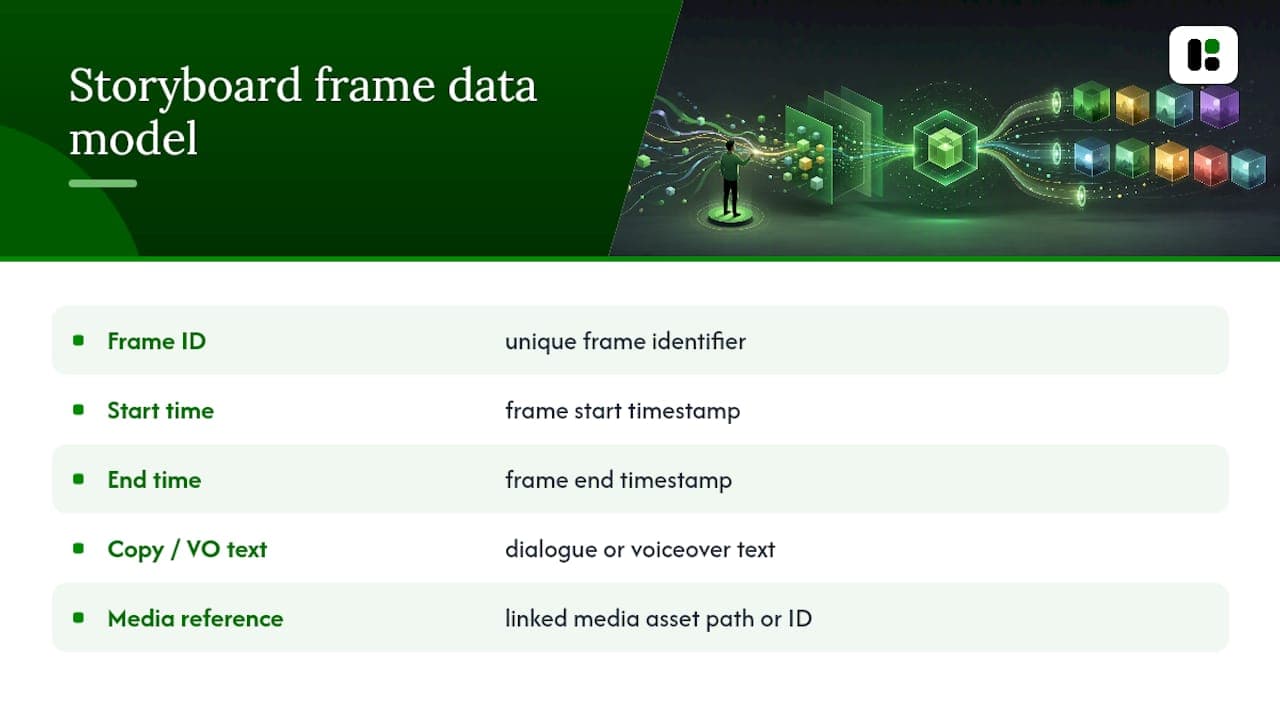
Naming conventions matter more than most teams admit. A frame labeled frame_03 in one system and 03_hook in another breaks the link between your storyboard and your render templates the moment someone automates the handoff.
Pro Tip: Pick one naming convention (something like campaign_frame#_aspectratio) and write it into the template itself as a locked field. The five seconds it takes to rename a file correctly is nothing compared to the hour lost tracing a broken automation back to a mismatched filename.
If you're comparing render tools once your frames are locked, a video creation tools roundup is worth a look before you commit to a pipeline.
Pre-Shoot Checklist and Common Pitfalls
Run this checklist before any board leaves your desk for production:
- Single-sentence goal is written at the top of the board.
- Hook frame is defined and, ideally, storyboarded in two or three variants.
- Every frame has annotated timing, not just a sequence number.
- Center-safe zones are marked for any frame crossing aspect ratios.
- Approval is versioned with a date and a named approver.
- Feedback happened in one consolidated round, not three scattered ones.
The most common failure isn't a missing shot. It's a frame that exists purely to look good. Over-indexing on visual polish distracts from the core message, and every frame that doesn't advance the narrative should get cut before it reaches the shoot day. The second-most common failure is skipping the vertical crop plan entirely and discovering the CTA button sits under Instagram's own UI only after the ad is live. Teams that want a second set of eyes on this before spending budget can run a pre-launch creative scorecard alongside their own checklist.
Why Standardized Templates Change Creative Ops
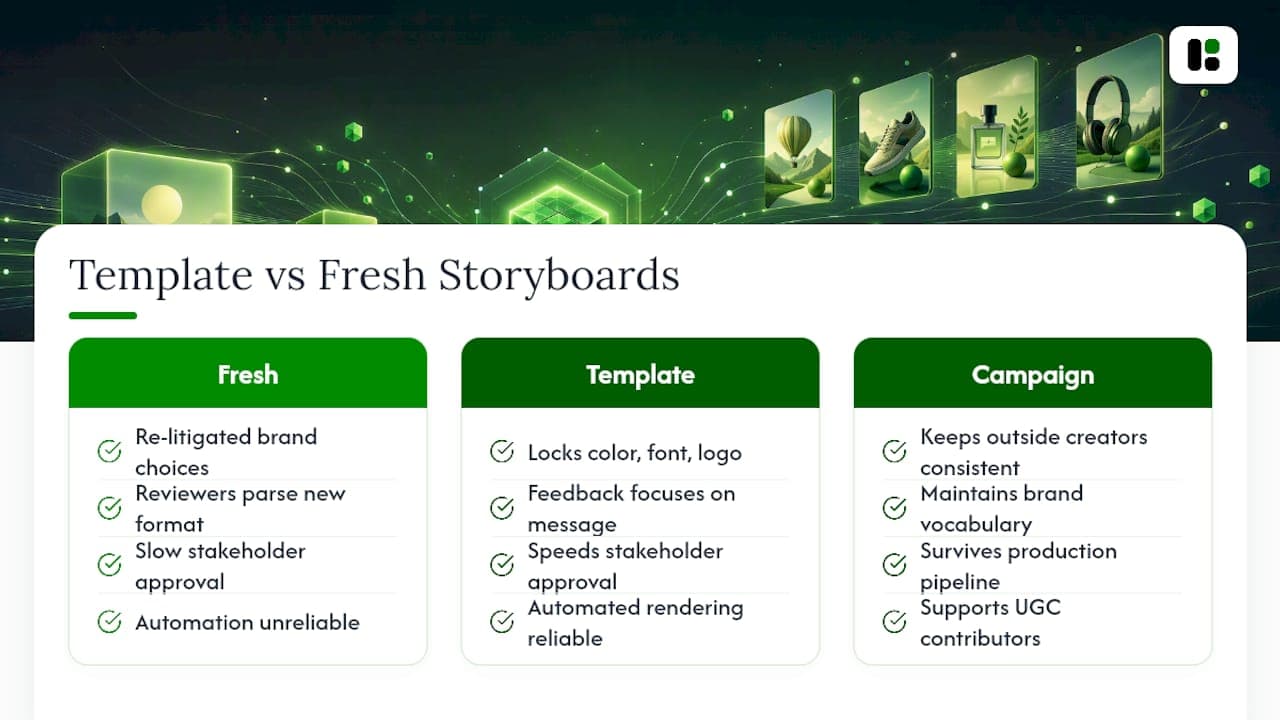
Most creative teams treat every storyboard as a fresh document, which means every reviewer relitigates the same brand questions on every project. A curated template library ends that cycle by locking color, font, and logo placement into the grid itself, so feedback rounds focus on the message instead of the mechanics.
Template-first storyboarding also has a quieter benefit: it makes automated rendering reliable at scale. A campaign-level story architecture keeps even outside creators or UGC contributors consistent with brand vocabulary, and a template-first library speeds stakeholder approval because non-creative reviewers aren't parsing a new format every time. That's the gap between a storyboard that looks nice and one that actually survives contact with a production pipeline.
— Desplega Labs
Try a Brand-Aware Storyboard Template on Assets.dev
Assets.dev is the fastest route from a locked storyboard to a rendered, on-brand video, without hiring a designer to rebuild your template every campaign. The platform learns your colors, fonts, and logo placement in seconds, then applies that branding automatically across every frame you export, whether you're pushing to LinkedIn, Instagram, or X.
Three moves to get started: create a free account, import a storyboard structure using the CLI or API, and run a test render in 9:16 to confirm your center-safe zones hold up. The free plan covers up to 10 videos or 100 image renderings with no card required, and through July new accounts get 1,000 credits instead of the usual 100. Beyond that, the only paid tier runs $9 a month. Check the full pricing breakdown and see which plan matches your render volume before your next campaign brief lands.
Sources
- How To Storyboard Brand Videos: A Marketer's Guide
- How to Make a Marketing Storyboard with AI (2026) | Storyflow
- Marketing video storyboard template — StudioBinder
- How to Use Storyboarding to Plan Marketing Videos That Convert
FAQ
What Is a Video Storyboard Template Used For?
It plans a short ad or social video frame by frame, capturing shot details, copy, timing, and platform flags before anyone starts filming or rendering.
How Many Frames Should a 30-Second Ad Storyboard Have?
Storyboard processes for short ads typically recommend 8 to 14 frames for a 30-second spot, scaling to 15 to 30 frames for a 90-second video.
How Do I Adapt One Storyboard for 16:9, 1:1, and 9:16?
Mark center-safe zones on every frame, flag any frame as vertical-only or horizontal-only where the crop won't work, and keep the hook and CTA inside the safest area of the frame.
What Fields Make a Storyboard Ready for Automated Rendering?
A frame ID, start and end time, copy or voiceover text, a media reference, platform flags, and asset tags form the minimal data model most render pipelines and MCP integrations need.
Can Assets.dev Generate Videos From a Storyboard Automatically?
Yes. Assets.dev applies your learned branding to storyboard frames and exports renders through its web app, CLI, API, or MCP integration, starting on a free plan of up to 10 videos.
What's the Biggest Mistake Teams Make With Storyboard Templates?
Adding frames that look impressive but don't advance the core message, a pitfall marketers specifically warn against, along with skipping vertical-crop planning until after the shoot.