Field note
Bulk Image Generation: A Marketer's Guide to Doing It Right
Discover how bulk image generation can streamline your marketing efforts, ensuring consistent branding across all your digital assets.
Bulk image generation is the process of producing many images from one input source, using a prompt run repeatedly, a spreadsheet of rows, or a design template fed by an API. For most marketing teams, the right starting point is a template or CSV-driven approach, not endless prompt variations, because campaigns need consistent branding across dozens or thousands of assets, not just novelty.
Here's the quick breakdown:
- Prompt×N: one creative idea, many AI-generated variations. Best for exploring concepts, moodboards, or hero images where you want surprise.
- CSV-driven: a spreadsheet row becomes an image (a product, a name, a stat). Best for catalogs, personalized ads, and data-driven creative.
- Template/API: a locked design with variables, rendered programmatically at scale. Best for brand consistency across hundreds of touchpoints.
If your business needs the same look across product listings, social posts, or ad sets, start with template or CSV-driven rendering. If you're still hunting for a creative direction, prompt×N gets you there faster. Platforms like assets.dev are built specifically for the templated route, with CLI, API, and MCP integrations that plug directly into a marketing team's existing automation.
Key Takeaways
Template and CSV-driven generation delivers consistent, on-brand images at scale, while prompt×N generation works best for creative exploration rather than production volume.
| Point | Details |
|---|---|
| Match mode to need | Use template/API rendering for brand consistency, CSV-driven for data-mapped assets, prompt×N for creative exploration. |
| Test before scaling | Run a small sample batch to catch failed rows, font issues, and aspect ratio problems before a full production run. |
| Build in QA layers | Combine automated moderation and legibility checks with a fixed human-review sample rate, not full manual review. |
| Budget for caching | Ask whether identical inputs get served from cache, since this can meaningfully lower recurring batch costs. |
| Pilot with assets.dev | The free plan offers up to 100 image renders with no card required, enough to test a template-based CSV workflow before subscribing. |
Table of Contents
- What "Bulk" Actually Means for Marketing Teams
- What to Look for in a Bulk-Capable Image Tool
- Step-by-Step Workflows for Each Bulk Generation Mode
- Automation Patterns for Marketing Pipelines
- How to Quality-Check Bulk Output Before It Ships
- What Bulk Image Generation Costs to Run
- Running a Pilot Bulk Image Project on assets.dev
- Legal and Ethical Considerations for Bulk AI Image Generation
- Data Security and Privacy When Handling Bulk Input Datasets
- Common Problems in Bulk Image Workflows and How to Fix Them
- Developer Docs and Guides Worth Bookmarking
- Why Templated Automation Beats Prompt Roulette
- Get Started With Bulk Image Generation on assets.dev
- Sources
- FAQ
What "Bulk" Actually Means for Marketing Teams
The word "bulk" gets used loosely, and that vagueness causes real problems when teams pick the wrong tool for the job. A marketer asking for "bulk image generation" might mean five different things depending on whether they're launching a product catalog, testing ad creative, or building a content calendar. Getting the mechanism right up front saves weeks of rework later.
-
Prompt×N (variation exploration). You have one creative brief and want to see what a model does with it ten or twenty times. This is the mode most people picture when they hear "AI image generation," but it's the least controllable. Useful for early concepting, mood boards, or when you genuinely don't know what the final image should look like yet.
-
CSV/per-row generation. Each row of a spreadsheet becomes one image. A SKU generates a product shot, a customer's name generates a personalized badge, a podcast episode number generates a thumbnail. This is where most e-commerce and lifecycle marketing work lives, and it depends entirely on clean, structured input data.
-
Template/API rendering. You design the layout once, mark the variable fields (headline, image, logo, color accent), then render it hundreds or thousands of times by feeding in new values. This is design-once, render-many, and it's the only approach that guarantees pixel-level brand consistency across an entire run.
-
Bulk-edit and parallel-run operations. Sometimes "bulk" means applying one change (a new watermark, a resized crop, a color correction) across an existing library rather than generating anything new. Parallel runs, meanwhile, refer to firing off many render or generation jobs concurrently rather than waiting on them sequentially, which matters once your batch sizes climb into the hundreds.
Mixing these up is the most common mistake marketing teams make. Someone asks a generative AI tool to produce "50 variations of our banner" when what they actually needed was a template with 50 rows of product data. The output looks close enough on a screen but breaks brand guidelines the moment legal or design reviews it. Knowing which of these four modes matches your actual business need is the real first step, well before comparing vendors or pricing.
What to Look for in a Bulk-Capable Image Tool
Not every AI image generator that claims "batch mode" can actually support a marketing team's production needs. Before committing to a workflow or a vendor, run it through a short checklist.
- Throughput limits. How many images can one batch call return, and how many rows can you submit per request? Some batch endpoints cap requests at 25 images per call, which is fine for a weekly social post run but means you'll need to chunk a 5,000-row product catalog into multiple submissions.
- Integration surface. Does the tool expose an API, a CLI, an MCP integration, webhooks, or only a manual CSV upload through a web dashboard? Teams running automated growth flows need at least API or CLI access; a upload-only interface works for smaller, occasional batches.
- Template fidelity. Can variables handle different data types (text, image URLs, hex colors, numbers), and does the system handle long headlines gracefully instead of overflowing the layout? Font loading matters too, especially for brand typefaces.
- Output fidelity. Check supported formats (PNG, JPEG, WebP, and sometimes PDF), aspect ratio flexibility for different platforms, color profile handling, and whether filenames and metadata are customizable enough to sort automatically into your asset library.
- Operational controls. What happens when row 347 of 1,000 fails because of a malformed URL? Look for failed-row reporting, partial-batch delivery, and clarity on whether failed renders still get billed.
- Security, IP, and licensing. Who owns the output, what happens to the input data after rendering, and does the commercial license cover paid advertising use, not just organic posts?
Pro Tip: Run a 20-image test batch before committing to a 2,000-image production run. Failed-row behavior, font substitution issues, and aspect-ratio surprises almost always show up in the first 20 and save you from discovering them at scale.
Throughput and integration surface tend to matter most for teams running recurring campaigns, while template fidelity and output fidelity matter most for anyone whose brand guidelines get scrutinized by a design lead. Security and licensing deserve a genuine read, not a skim, particularly if your input data includes customer names or proprietary product details.
Step-by-Step Workflows for Each Bulk Generation Mode
Each of the three core modes has its own operational rhythm. Here's what running each one actually looks like from first input to delivered assets.
Prompt×N workflow
- Build a small prompt library instead of one prompt. Write 3 to 5 phrasings of the same creative concept, varying angle, lighting, or composition language.
- Batch-run each prompt variant, generating 8 to 12 images per prompt rather than expecting one perfect result on the first try.
- Filter fast. Cut anything with obvious artifacts, off-brand color, or composition issues before a human spends time reviewing borderline cases.
- Iterate on the surviving prompt phrasing, not the whole library, since the winning variant usually reveals which specific words or modifiers the model responded to.
This mode rewards patience with prompt language more than it rewards raw volume. Ten well-considered variants of a sharp prompt beat 40 variants of a vague one.
CSV-driven workflow
- Define your CSV schema before touching any tool. Decide which columns represent text fields, image URLs, colors, and numeric values, and keep column headers consistent with the naming convention your template expects.
- Map each column to a template variable. This is usually a one-time setup step: headline maps to
{{title}}, product photo maps to{{image_url}}, price maps to{{price}}. - Submit the batch. Most systems accept an array of row objects in a single API call or a CSV upload through a dashboard.
- Validate outputs against a sample before running the full set. Check for text overflow, broken image links, and formatting edge cases (currency symbols, long product names).
- Name files systematically, ideally using a row identifier (SKU, user ID) so outputs sort automatically into the right folder or CMS bucket.
CSV-driven runs live or die on data hygiene. A single malformed URL or an unescaped comma in a product description can quietly break a dozen renders, so validating a 20-row sample before a 2,000-row submission isn't optional.
Template/API workflow
- Design the template once, ideally in a tool that supports variable placeholders directly in the layout rather than requiring a developer to hard-code positions.
- Mark every variable field explicitly: text, image, color, and logo placeholders should each be named clearly.
- POST the batch. HTML/CSS-to-image style services accept a
template_idplus an array oftemplate_values, letting you submit dozens of variations in a single request. - Handle the response asynchronously. Larger batches typically return job IDs rather than immediate images, and a
batch.completedwebhook fires once rendering finishes, which is far more efficient than polling an endpoint repeatedly.
When to choose each approach: pick prompt×N when you're still defining the creative direction and need to see options fast. Pick CSV-driven generation when your assets map cleanly to existing structured data, like a product feed or a CRM export. Pick template/API rendering when brand consistency across a large volume matters more than novelty, which describes most recurring marketing production work. Scaling notes matter here too: prompt×N gets expensive and unpredictable past a few hundred images, while template/API rendering scales linearly and predictably into the tens of thousands.
Automation Patterns for Marketing Pipelines
The architecture behind a working bulk image pipeline usually follows the same shape regardless of the tool: CSV ingestion → batch API call → webhook confirmation → storage/CDN delivery. Data enters as structured rows, a batch endpoint processes them against a template, a webhook confirms completion, and the resulting files land in cloud storage behind a CDN for fast delivery into ads, emails, or a CMS.
For developers working inside a Next.js or similar framework, ImageResponse-style generation offers a different but related pattern: rendering images from JSX and CSS at runtime or build time, directly inside route handlers. This approach shines for dynamic, per-URL social cards and Open Graph images rather than massive catalog runs. It's worth knowing the constraint here: Next.js caps the ImageResponse bundle at 500 KB, which is plenty for a social card but a real limit if you're trying to embed heavy custom fonts or large background assets.
A quick reference stat worth internalizing: batch endpoints commonly cap a single request around 25 images per call, which means any catalog or campaign larger than that needs a loop or queue that submits multiple batches rather than one giant request.
Batch API patterns generally follow this shape:
- Submit up to the platform's per-call row limit (often 25, sometimes higher depending on the provider).
- Receive an async job ID rather than an immediate image array for larger submissions.
- Listen for a
batch.completedwebhook instead of polling, which cuts unnecessary API calls and simplifies integration into CI/CD or marketing automation tools. - Paginate through results if the provider returns them in chunks rather than all at once.
Operationally, a few things separate a pipeline that survives contact with a real 5,000-image job from one that falls over on batch 40. Rate limiting needs a backoff strategy, not a hard retry loop that hammers the API the moment it returns a 429. Retries should be idempotent, meaning resubmitting a failed row doesn't create a duplicate render. Partial failures need visibility. A pipeline that silently drops 12 failed rows out of 1,000 and reports "done" is worse than one that fails loudly. Caching identical inputs matters too, since a repeat request with the same template and variables can often be served from cache instead of triggering a fresh, billable render.
File handling deserves its own attention. Use a naming convention tied to the source data (SKU, campaign ID, row number) rather than sequential generic filenames, and structure output folders by campaign or batch date so a designer or reviewer can find a specific asset without searching through thousands of identically named files. If you're serving images through a CDN, build cache invalidation into the pipeline from day one. Nothing kills a launch faster than a marketing team publishing updated creative that the CDN keeps serving in its old, cached version. For teams building this kind of dynamic image pipeline in-house, a developer guide to dynamic image APIs walks through the integration patterns in more technical detail.
How to Quality-Check Bulk Output Before It Ships
Bulk generation produces volume fast, but volume without curation is just a bigger pile of unusable assets. The quality control layer is where a marketing team earns back the time bulk generation was supposed to save.

Start with variant strategy. Generating 8 to 12 variants per prompt or per row and curating the winners works better than trying to engineer a single perfect output, because AI image models are inconsistent even with identical inputs. Build the curation step into the workflow from the start rather than treating it as an afterthought.
Automated QA catches the obvious problems before a human ever looks at the batch:
- Moderation filters to flag NSFW or off-brand content before it reaches a reviewer's queue.
- Text legibility checks, especially for templates with dynamic headline lengths that can overflow or clip.
- Sizing and aspect ratio validation against the platform specs you're targeting (square for Instagram grid, 1.91:1 for a LinkedIn link post, and so on).
Post-processing turns a raw render into a finished asset. Background removal, upscaling low-resolution outputs, color normalization across a batch so product shots match under the same lighting assumptions, and embedding metadata (alt text, campaign tags) all belong in this stage. Doing this as a batch operation rather than one image at a time is where the real time savings show up.
Pro Tip: Set a fixed human-review sample rate, something like reviewing 1 in every 10 rendered images in a batch, rather than reviewing everything or nothing. A full manual review defeats the purpose of automation; zero review means brand mistakes slip into a live campaign.
Human-in-the-loop sampling needs an acceptance threshold and a rollback plan. Decide in advance what percentage of a sample can fail QA before the entire batch gets flagged for regeneration, and keep the process for pulling a bad asset from a live campaign as simple as swapping a file in the CDN bucket.
Auditability rounds this out. Keep the original render inputs (the CSV row, the template ID, the prompt text), the batch ID, and a version history of outputs. When a compliance question comes up six months later about where a specific image came from, this record is the difference between a five-minute answer and a frustrating archaeology project.
What Bulk Image Generation Costs to Run
Bulk image pricing generally falls into one of four shapes: per-image credits, per-render charges, per-batch flat fees, or subscription tiers that bundle a monthly allowance of renders. Which shape fits your team depends on how predictable your volume is.
Per-image credit systems charge you for every render, which works fine for occasional or unpredictable volume but gets expensive fast once you're running recurring weekly batches. Subscription tiers with a monthly render allowance tend to be more predictable for ongoing production, since you know your ceiling cost regardless of how many campaigns you run that month.
Caching materially changes the math here. Systems that detect identical inputs and serve a cached result instead of billing for a fresh render can meaningfully cut costs on any workflow with repeat elements, like a template that gets reused across multiple campaigns with only the headline changed. This is worth asking about directly when comparing pricing pages, since it's rarely advertised prominently.
A simple budget model looks like this: (number of source images or rows) × (variants per image) × (cost per render) + post-processing costs. If you're generating 200 product images with 3 variants each at a modest per-image credit cost, plus a flat post-processing pass for background removal, that's your baseline number before you add any premium hero-shot work.
- Use template/API rendering for recurring, predictable volume where cost-per-image needs to stay low and consistent over time.
- Reserve higher-cost, on-demand generative modes for hero shots, campaign key art, or anything where creative quality matters more than unit economics.
- Watch for hidden costs in failed-row billing. Some providers charge for a render attempt even if the output fails QA on your end.
The general pattern across the market is that batch and automation cut both time and per-unit cost compared to generating and reviewing images one at a time, which is really the whole economic case for building a bulk pipeline in the first place.
Running a Pilot Bulk Image Project on assets.dev
assets.dev is built around exactly the template/API workflow described above: curated marketing templates that the platform's system customizes to your brand automatically, using CLI, API, and MCP integrations so it fits directly into an existing automation flow. The brand-learning step happens in seconds rather than requiring a lengthy setup, which matters if you want to pilot a batch job the same week you decide to try it.
The trial path is low-friction by design. The free plan requires no credit card and covers up to 10 videos or 100 image renderings, enough to run a real pilot batch (a product catalog subset, or a week of social variants) before deciding whether to commit further. The one paid tier runs $9 per month for expanded usage, and assets.dev is currently offering 1,000 credits instead of the usual 100 for new users signing up in July.
For a marketing team piloting this, the practical path looks like:
- Upload your brand assets and let the platform learn your visual identity.
- Map a CSV export from your product feed, CRM, or content calendar to a template's variable fields.
- Submit a small batch through the API or CLI first, validate the outputs, then scale to the full run.
- Export in the formats your channels need, whether that's a LinkedIn link post ratio or an Instagram square.
| What assets.dev offers | Detail |
|---|---|
| Free tier | Up to 10 videos or 100 image renders, no card required |
| Paid tier | $9 per month for expanded usage |
| Integration | CLI, API, and MCP support for automated growth flows |
| Asset types | Images, videos, and PDFs across LinkedIn, Instagram, Google, X, and Substack formats |
Legal and Ethical Considerations for Bulk AI Image Generation
Running thousands of AI-generated images through a marketing pipeline raises copyright and licensing questions that a single hero image never forces you to confront. The core issue is usage rights: does the license attached to your image generation tool cover commercial use, including paid advertising, or only organic social posting? These terms vary significantly between providers and are worth reading directly rather than assuming.
Model licensing matters just as much. Some AI image models restrict certain commercial applications or require attribution, and those restrictions typically apply to every image the model produces, not just a single output you happened to notice. Since a bulk run might use the same model to generate thousands of variations, any licensing restriction gets multiplied across the entire batch rather than affecting one image in isolation.
There's also an ethical dimension around likeness and trademark. Bulk-generating images that incorporate recognizable people, brand logos, or copyrighted characters, even accidentally through a model's training data, creates legal exposure that scales with volume. A CSV-driven batch pulling in third-party product photos needs the same rights clearance a single campaign asset would need, just applied consistently across every row.
The safest practice for marketing teams is to confirm the license terms cover paid commercial use before running a production batch, keep records of which model or template generated which asset for accountability, and treat any uncertain rights question as a reason to pause the batch rather than push through it.
Data Security and Privacy When Handling Bulk Input Datasets
A CSV feeding a bulk image job often contains more sensitive information than it looks like at first glance. Customer names for personalized creative, internal SKU data, pricing information, or even email addresses used to generate personalized thumbnails all count as data that needs handling discipline, not just a spreadsheet you forward to a vendor.

Before uploading any dataset to a third-party tool, check where that data goes after the render completes. Some platforms retain uploaded data for caching or model improvement purposes; others delete it immediately after processing. This distinction matters enormously if your CSV includes personally identifiable information tied to real customers rather than generic product data.
Access control matters at the pipeline level too. If your batch job runs through an API key shared across a marketing team, rotate that key periodically and scope its permissions to only what the image generation task requires. A leaked API key tied to a bulk image tool is a smaller blast radius than one tied to your entire customer database, but it's still an unnecessary risk if the key has broader access than the job needs.
For regulated industries or teams handling customer PII, the practical baseline is straightforward: strip or anonymize any field the render doesn't actually need, confirm the vendor's data retention policy in writing rather than assuming, and never route unencrypted customer data through a batch job that wasn't specifically vetted for that kind of handling.
Common Problems in Bulk Image Workflows and How to Fix Them
The same handful of problems show up across almost every bulk image project, regardless of which tool or workflow a team chooses.
Malformed data breaking silent rows. A missing image URL or an unescaped special character in one CSV row can fail that render without stopping the rest of the batch, and if your pipeline doesn't report failed rows explicitly, you won't notice until a reviewer spots a gap. Fix this by validating a sample batch first and insisting on failed-row reporting from whatever tool you use.
Inconsistent branding across a large run. Prompt-based generation is especially prone to drift, where image 40 looks noticeably different from image 4 even with an identical prompt. Template-based rendering solves this structurally, since the layout and brand elements stay fixed and only the data changes.
Text overflow in dynamic templates. Long product names or headlines can break a template's layout in ways that only show up once real data runs through it, not during design review with placeholder text. Build character limits or truncation logic into the template itself rather than hoping every input fits.
Rate limiting and timeouts on large batches. Submitting an entire 5,000-row job as one request usually fails somewhere. Chunk large jobs and build in retry logic with backoff rather than assuming a single massive call will complete cleanly.
Underestimating review time. Teams often plan for generation time but not curation time. Budget review capacity into the project timeline from the start, not as an afterthought once the batch finishes.
Developer Docs and Guides Worth Bookmarking
Before building a pipeline, these references save real implementation time:
- Next.js ImageResponse documentation for dynamic, JSX-based image generation at runtime or build time.
- HTML/CSS to Image batch endpoint docs for template-driven batch rendering with example curl requests.
- Batch AI image generation guide for a practical walkthrough of input preparation, model selection, and quality control at volume.
- Batch content creation workflow guide for a marketer-facing take on templated production at scale.
Why Templated Automation Beats Prompt Roulette
Most advice on bulk image generation still treats it as a prompt-engineering problem: write a clever enough prompt, run it enough times, and eventually you'll get lucky. That framing works for a single hero image. It falls apart the moment a marketing team needs 500 on-brand assets by Friday, because luck doesn't scale and brand consistency isn't negotiable in a real campaign.
The evidence points somewhere more boring and more useful: treat bulk generation as a data problem first, a creative problem second. A clean CSV schema and a well-built template will outproduce a brilliant prompt run ten times over, because the template removes variance instead of hoping the model gives you the same quality on render 200 that it gave you on render 2.
What gets underestimated is how much of the real work is data hygiene and QA sampling, not the generation step itself. Teams that skip straight to "generate everything" without a validation pass on a small sample almost always find the expensive mistakes at batch 300, not batch 3. Prioritize the pipeline, not the prompt.
Get Started With Bulk Image Generation on assets.dev
If the workflows above sound like more setup than your team wants to build from scratch, assets.dev gets you to a working template/API pipeline without hiring a developer to wire one together. Instead of stitching together a rendering API, a CSV parser, and a webhook listener yourself, you get curated templates that already handle variable mapping, brand consistency, and export formatting for LinkedIn, Instagram, Google, X, and Substack out of the box.
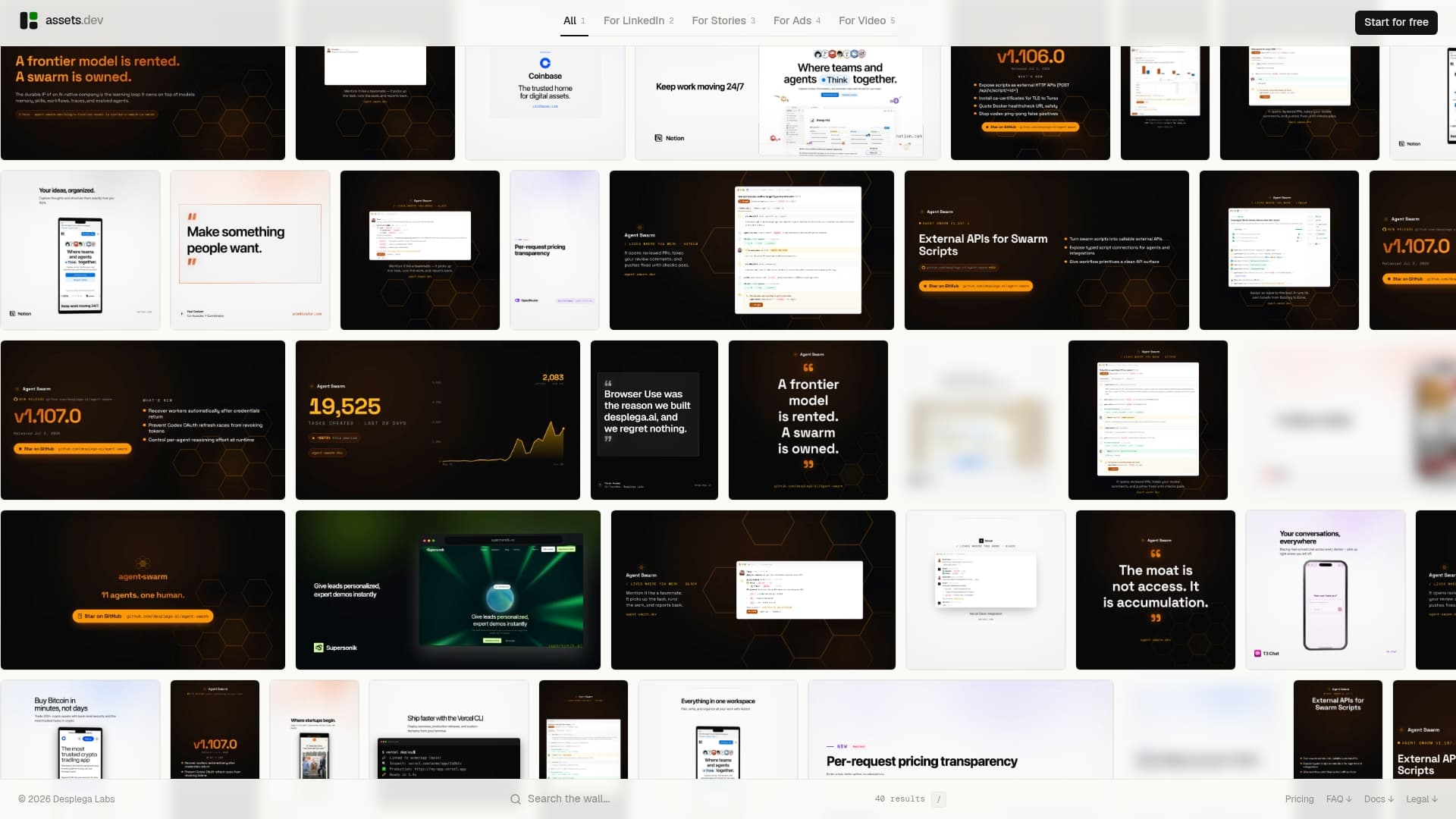
The platform learns your branding in seconds, meaning a new template already matches your colors, fonts, and logo placement before you touch a single setting. That's the gap most bulk tools leave open: they'll render a thousand images fine, but keeping every one of them on-brand still falls on a human. CLI, API, and MCP integrations mean your existing growth automation can call assets.dev directly rather than treating it as a separate manual step.
The free plan covers up to 10 videos or 100 image renders with no card required, and new users signing up in July get 1,000 credits instead of the usual 100. If you're planning a catalog refresh, an ad variant test, or a recurring content calendar, Assets and see how far 100 renders takes your first real campaign.
Sources
- Next.js ImageResponse documentation
- HTML/CSS to Image docs — dynamic images and batch endpoint
- Batch AI image generation: How to create hundreds of visuals in minutes
FAQ
How do you generate images in bulk?
Generate images in bulk by choosing a mechanism that matches your data: prompt×N for creative exploration, CSV-driven generation when each image maps to a data row, or template/API rendering for consistent, branded output at scale. Most marketing production work uses the CSV or template approach because it guarantees brand consistency across the entire run.
Which AI tools can generate images in bulk?
Tools vary by mode: some specialize in prompt-based batch generation for creative variation, others expose batch endpoints built for template-driven rendering, and platforms like Assets combine curated templates with API, CLI, and MCP integration specifically for marketing-scale production.
Is there a completely free AI image generator?
Free tiers exist but almost always come with render limits or watermarks. assets.dev's free plan, for example, offers up to 10 videos or 100 image renders with no credit card required, which covers a genuine pilot batch before any payment is needed.
Is ChatGPT the best tool for bulk image generation?
ChatGPT's image generation works well for one-off creative exploration but isn't built around the batch endpoints, CSV mapping, or template variables that marketing-scale bulk production depends on. A template-based or batch-API approach fits recurring, brand-consistent production more reliably than a conversational prompt interface.