Field note
Batch Content Creation: A Practical Workflow Guide
Discover how to maximize efficiency with batch content creation. Learn practical steps to fill your publishing calendar in just 90 minutes!
Batch content creation means producing multiple finished posts in focused, task-grouped sessions rather than creating one post at a time. Done right, a single day of batching can fill 2–4 weeks of your publishing calendar. Here's how to start in the next 90 minutes:
- Pick 3–5 content pillars that map to your business goals (education, social proof, product, community, trends).
- Block a dedicated session of 3–6 hours with no meetings and no notifications.
- Create at least 10 variants from 2 source assets (one long-form piece or recording becomes clips, captions, carousels, and quote images).
- Queue everything into a scheduler before the session ends.
- Reserve 2–3 reactive slots per week for timely, unplanned posts so your calendar stays flexible.
Key Takeaways
Batch content creation works because grouping identical production tasks eliminates context-switching costs and produces weeks of scheduled content from a single focused session.
| Point | Details |
|---|---|
| Start with a strategy layer | Define 3–5 pillars and a CTA per pillar before your first batch session. |
| Use a one-day batch cycle | Plan, draft, produce, edit, QA, and schedule in a single structured day to yield 2–4 weeks of posts. |
| Atomize from source assets | Derive 4–6 formats from each source recording or article instead of creating each post from scratch. |
| Build a functional calendar | Use Notion, Airtable, or Sheets with 10 core fields and plan 4–6 weeks ahead for social content. |
| assets dev for design batching | Brand-aware templates and batch rendering via API/CLI replace manual design steps in every production block. |
Table of Contents
- What is batch content creation, exactly?
- Why batching pays off in ways most creators underestimate
- Set the strategy first — the step most teams skip
- A copyable step-by-step batching workflow
- Content calendar fields and a template you can copy
- Which tool types to use and where assets dev fits
- Scheduling tactics and a repurposing matrix
- How to measure batching success and run monthly reviews
- How to sustain batching without burning out
- Common batching mistakes teams make and how to fix them
- What actually works in batch production at scale
- assets dev makes batch production faster from day one
- Sources
- FAQ
What is batch content creation, exactly?
Content batching groups the production of multiple finished posts — visuals, copy, captions — into concentrated work sessions so you can schedule them ahead. Instead of writing one caption on Monday, filming one clip on Tuesday, and designing one graphic on Wednesday, you do all the writing in one block, all the filming in another, and all the editing in a third.

Two distinct activities live inside this method. Production batching means repeating the same task type back-to-back (scripting 12 posts in a row, recording 8 short videos in one shoot). Scheduling and buffering means queuing the finished assets into a tool that publishes them on a set cadence. Both matter, but production batching is where the real time savings happen.
A concrete example: one 45-minute interview recording can yield a short-form video clip, a carousel pulling the three best quotes, a text thread, a LinkedIn article intro, and two standalone image posts. That's six pieces of content from a single source asset, all produced in one editing session
Why batching pays off in ways most creators underestimate
The efficiency case is straightforward. Context switching costs roughly a couple dozen minutes of refocus time per task shift — every time you stop scripting to answer a Slack message and then try to write again, you lose that window. Batching eliminates most of those transitions by keeping you in one cognitive mode for hours at a time.
Beyond raw speed, batching delivers:
- Predictable publishing. A scheduled queue means you post consistently even during busy weeks, travel, or launches.
- Higher content quality. When you're not rushing to fill tomorrow's slot, you can write better hooks, choose better visuals, and QA more carefully.
- Easier repurposing. Producing in clusters makes it natural to atomize one source into multiple formats rather than treating each post as a standalone creative task.
- Better measurement. Publishing in planned batches tied to specific pillars makes it far easier to isolate what's working by theme.
- Faster team scaling. Defined production blocks let you hand off discrete tasks (scripting to one person, design to another) without constant coordination overhead.
The secondary benefit most teams miss: batching creates natural experimentation windows. When you produce 10 posts on the same topic in one session, you can deliberately vary the hook format across them and surface a winner within two weeks.
Set the strategy first — the step most teams skip
Batching without a strategy layer produces volume, not results. Before your first batch session, you need four artifacts:
- A pillar list of 3–5 themes your content will consistently cover.
- A target CTA per pillar (what action should each theme drive?).
- A cadence table matching post frequency to your current follower tier and goals.
- A brief template so every piece of content starts from a defined structure, not a blank page.
A pillar is only viable if it can generate 10 or more distinct posts without repetition. Test it by brainstorming 10 post ideas right now. If you stall at four or five, the pillar is too narrow — either broaden it or merge it with a related theme.
For cadence, accounts under 10K followers often benefit from 5–7 posts per week during a cold-start phase, while accounts in the 10K–50K range can pull back to 4–5 posts per week and prioritize quality. Match your frequency to what your team can sustain at a high standard, not to an arbitrary daily target.
Planning horizons matter too. A 90-day plan with firm commitments and 180 days of flexible placeholders gives you enough structure to batch efficiently while leaving room to respond to trends. Run a weekly 15-minute review to catch anything drifting off-pillar.
Pro Tip: The biggest productivity multiplier in batching is atomizing a single source recording into many variants — not treating each post as a separate creative task. Before your batch session, identify your two or three strongest source assets and plan how many derivative formats each one can produce.
A copyable step-by-step batching workflow
The core workflow has six phases. Time-block each one separately — never mix drafting and editing in the same block.
- Plan and brief (60–90 min): Confirm your pillar focus for this batch, pull your brief template, and list every piece of content you'll produce. Assign a hook angle and CTA to each.
- Draft or script (90–120 min): Write all copy, captions, and scripts back-to-back. No editing yet.
- Batch production (2–4 hours): Film, record, or design all assets in sequence. Keep the same setup for all video content so you're not resetting between takes.
- Edit and atomize (2–3 hours): Cut footage, resize images, and derive all secondary formats from each source asset.
- QA (30–45 min): Check every post for brand consistency, link accuracy, and caption completeness.
- Schedule (30–45 min): Load everything into your scheduler and confirm publish dates against your calendar.
Sample one-day batch cycle
Atomization rules: aim for at least 4–6 derivative formats per source asset. Flip the hook (question vs. statement vs. statistic), swap the CTA (follow vs. comment vs. click), and resize for each channel. That alone multiplies your output without adding creative work.
Content calendar fields and a template you can copy
A calendar is only useful if your team actually fills it in. Choose a tool your team will genuinely use — Notion, Airtable, or Google Sheets — build the template structure first, and plan 4–6 weeks ahead for social content.
The minimum fields for a functional calendar are:
- Working title — the internal reference name
- Pillar — which content theme this belongs to
- Channel — LinkedIn, Instagram, X, Substack, etc.
- Format — video, carousel, image post, text thread
- Production start date — when creation begins
- Review date — when QA happens
- Publish date — when it goes live
- Owner — who is responsible
- Status — idea / in production / in review / scheduled / published
- Distribution notes — cross-posting instructions, hashtag sets, link variants
Sample calendar row
| Field | Example value |
|---|---|
| Working title | "3 signs your content strategy is broken" |
| Pillar | Education |
| Channel | LinkedIn + Instagram |
| Format | Carousel (LinkedIn) / Image quote (Instagram) |
| Production start | Monday |
| Review date | Wednesday |
| Publish date | Friday |
| Owner | Content lead |
| Status | In production |
| Distribution notes | Repurpose caption as X thread on Saturday |
Map production windows backward from publish dates. If a carousel takes three days from brief to final asset, your production start date is at least three days before publish. Long-lead formats like video series or PDF guides need a week or more of lead time — build that buffer into the calendar before you schedule anything.
Pro Tip: Reserve a dedicated "reactive" section in your calendar, separate from planned content, so time-sensitive ideas don't displace posts that are already in production. A dedicated reactive slot keeps your batch schedule intact while still letting you respond to trends.
Which tool types to use and where assets dev fits
No single tool handles every phase of a batch workflow. Think in categories:
- Content calendar and project management: Notion, Airtable, or Google Sheets for planning; Asana or Linear for team task tracking.
- Brief and script templates: A shared doc library or a template-driven platform that standardizes your brief format.
- Batch rendering via API or CLI: For teams producing high volumes of image or video variants, programmatic rendering cuts manual export time dramatically. See automated video creation workflows for practical pipeline examples.
- Post schedulers: Buffer, Later, or native platform schedulers for queuing and publishing.
Solo creators can run a lean stack: one calendar tool, one design/template tool, and one scheduler. Small teams add a project management layer and shared brief templates. Agencies add approval workflows, role-based access, and API integrations between tools.
Scheduling tactics and a repurposing matrix
Queue your posts to publish at your channel's peak engagement windows, but don't obsess over exact timing at the expense of consistency. A post published at 9:15 AM instead of 9:00 AM matters far less than publishing every week without gaps.
Schedule 2–4 weeks ahead for social content. Beyond four weeks, trends shift and some posts will feel stale. Keep two or three reactive slots open each week for timely content that can't be batched.
Repurposing matrix
| Source asset | Derived formats |
|---|---|
| Long-form video (10–20 min) | 3–5 short clips, 2 image quotes, 1 caption thread, 1 LinkedIn article intro |
| Podcast episode | 2–3 audiograms, 1 key-takeaway carousel, 1 newsletter section |
| Blog post | 1 LinkedIn text post, 1 carousel, 2–3 image quotes, 1 X thread |
| Webinar recording | 3–5 clips, 1 slide-based carousel, 1 PDF summary, 2 quote images |
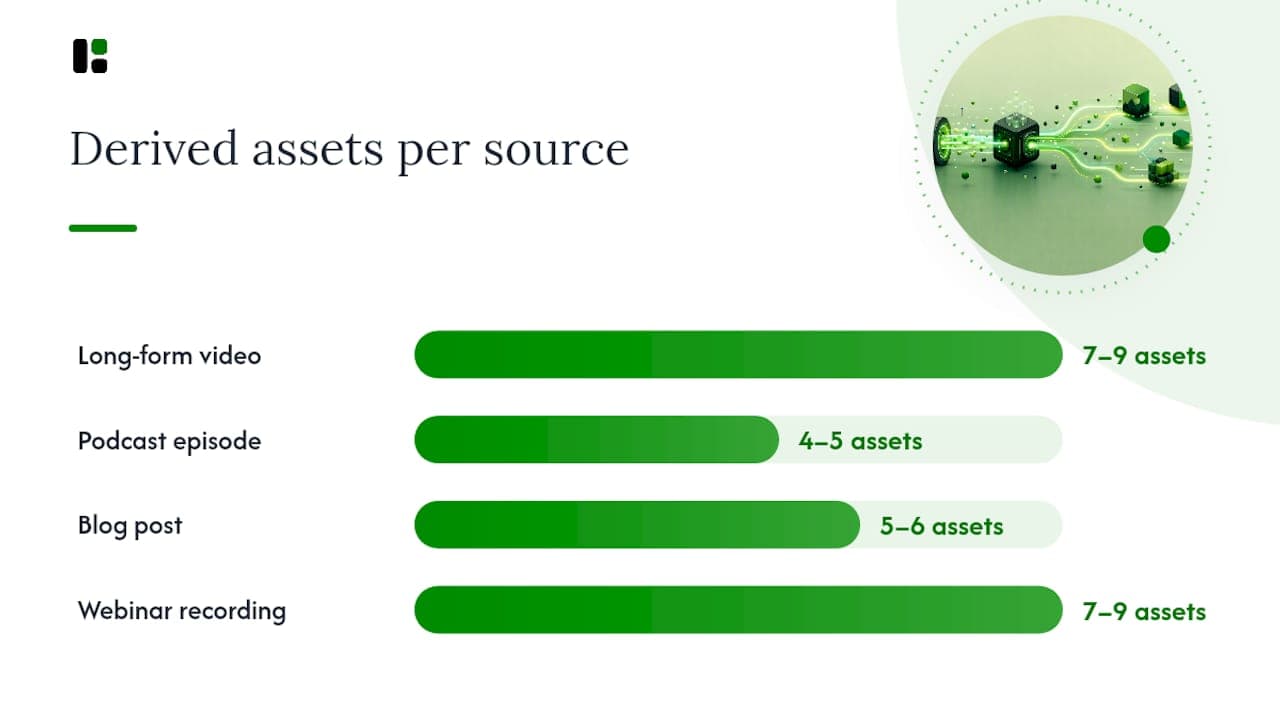
For repurposing long-form recordings into short social assets, AI-assisted tools can cut clip selection and caption generation time significantly. The key is identifying your three strongest moments in the source asset before you start editing — that decision point is where most of the time goes.
How to measure batching success and run monthly reviews
Track these metrics per pillar, not just per post:
- Reach and impressions — are you growing your audience?
- Engagement rate — are people responding to the content?
- CTR — are posts driving clicks when that's the goal?
- Conversions tied to CTA — are pillar-specific CTAs producing leads, sign-ups, or sales?
The monthly review process is simple: sort all content from the past 30 days by your primary success metric, group by pillar, kill the bottom 20% of formats or topics, and double down on the top 20%. This creates a refinement loop that makes each batch cycle smarter than the last.
For experimentation inside batch cycles:
- Pick one variable per batch (hook format, CTA phrasing, visual style).
- Produce at least four variants of that variable across the batch.
- After two weeks, compare performance and carry the winner into the next cycle.
How to sustain batching without burning out
The most common reason batching fails after month two is an unsustainable cadence set in month one. A few rules that hold:
- Timebox your batch sessions. A six-hour session is productive. An eight-hour session produces diminishing returns and leaves you dreading the next one.
- Rotate creative ownership. If one person scripts every batch, they'll burn out. Assign scripting, design, and scheduling to different people or alternate weeks.
- Set realistic publish targets. Twelve posts per week sounds impressive until you're producing 48 posts per month with a team of two.
- Keep a rolling 4-week planning horizon. Planning further ahead than four weeks for social content wastes time — trends shift and priorities change.
Pro Tip: Separate drafting and editing into strictly different time blocks. Writing a first draft while simultaneously trying to refine it is the fastest way to slow a batch session to a crawl. Write everything rough first, then switch modes entirely for the edit pass.
Common batching mistakes teams make and how to fix them
- Skipping the strategy layer. High-volume output that doesn't map to pillars or goals produces engagement without business results. Fix: define your pillar list and CTA per pillar before your first batch session.
- Batching only scheduling, not production. Queuing posts in advance is useful, but the real efficiency gain comes from grouping production tasks. Fix: block production time explicitly, not just scheduling time.
- Batching the wrong unit. Treating each post as a separate creative task instead of atomizing from a source asset is the most common productivity leak. Fix: always start from a source asset and derive variants.
- Over-automating without QA. Automated publishing without a review step produces off-brand or error-filled posts at scale. Fix: build a 30-minute QA block into every batch session before scheduling.
- No review loop. Batching without measuring means you repeat what doesn't work. Fix: run a 30-minute monthly review using the sort-group-kill-double-down method above.
One team running a B2B LinkedIn account switched from daily ad-hoc posting to a weekly two-hour batch session. Within six weeks, their posting consistency went from three days per week to five, and their engagement rate climbed as their pillar-focused content started building recognizable themes their audience could follow.
Pro Tip: The fix for most batching failures is the same: add the strategy layer you skipped. Pillars, goals, and a brief template take 90 minutes to set up and prevent months of wasted production.
What actually works in batch production at scale
Most articles on batching focus on the calendar and the tools. The real leverage is upstream: the quality of your source assets and the discipline of your brief template. A weak source recording produces weak derivatives no matter how efficiently you atomize it. A strong brief template means every piece of content starts with a clear hook, a defined audience, and a specific CTA — which cuts editing time in half.

The other thing most practitioners underestimate is the cognitive cost of mixing modes. When you write and edit in the same block, you're not saving time — you're spending twice as much mental energy on half the output. The teams that sustain batching over months are the ones who treat drafting and editing as completely separate disciplines, scheduled on different days when possible.
assets dev's template library has been useful in the design phase specifically because it removes the blank-canvas problem. Starting from a brand-aware template for a LinkedIn carousel or an Instagram image post means the design decisions are already made — you're filling in content, not building from scratch. That's the same principle as batching applied to the design layer.
assets dev makes batch production faster from day one

The slowest part of most batch sessions isn't writing or filming — it's the design and export phase, where you rebuild the same branded template for each format and channel. assets dev removes that bottleneck. Its brand-aware template library covers images, videos, and PDFs for LinkedIn, Instagram, X, Google, and Substack. The platform learns your branding in seconds and applies it across every asset type, so a batch of 15 posts doesn't require 15 separate design setups.
For teams with automated growth flows, the CLI, API, and MCP integrations let you push renders directly into your pipeline without manual exports. The free plan includes up to 10 videos or 100 image renders with no credit card required. Through July 2026, new accounts receive 1,000 credits instead of the standard 100. The paid plan is $9 per month. Assets and run your first batch session today.
Sources
- How to create and batch social media content | Learn at Microsoft ...
- content-plan-calendar
- How to Create a Content Calendar (Data-Backed Template for 2026)
- How to Create a Content Calendar (Step-by-Step) - Scale Growth Digital
- The real cost of context switching in the enterprise
FAQ
What is batch content creation?
Batch content creation is the practice of producing multiple finished posts — copy, visuals, and captions — in dedicated, task-grouped sessions rather than one post at a time, so they can be scheduled ahead.
How do you batch write content?
Write all captions, scripts, or copy back-to-back in a single drafting block without editing. Switch to a separate editing block only after all first drafts are complete.
How do you batch create social media content?
Pick 2–3 source assets, block a full production day, and derive 4–6 formats from each source (clips, carousels, image quotes, captions). Queue everything into a scheduler before the session ends.
What are the core steps of a content creation workflow?
A repeatable workflow runs six steps: plan and brief, draft or script, batch production, edit and atomize, QA, then schedule. Each step belongs in its own time block.
Can assets dev help with batch content creation?
Yes. assets dev provides brand-aware templates for images, videos, and PDFs across major platforms, with CLI and API integration so renders feed directly into automated publishing flows. The free plan covers up to 10 videos or 100 image renders.