Field note
Asset Version Control for Creative Teams: A Practical Guide
Discover how asset version control can streamline workflow for creative teams. Enhance collaboration, manage files efficiently, and reduce conflicts.
Asset version control is a tracked, restorable history of digital assets combined with workflow states, metadata, and access rules that govern how those assets move from draft to published. For creative and marketing teams, the recommended pattern is a DAM or asset-aware version control system that supports versioned metadata, file-locking for large binaries, and automated state transitions from editable to frozen. If your team is remote, prioritize distributed backups for resilience. If you work with heavy binary files, centralized locking prevents overwrite conflicts. If you publish to multiple channels, metadata and pipeline integrations are what actually hold the system together.
A few signals to orient your choice quickly:
- Binary-heavy workflows (video, 3D, raw images): centralized locking is non-negotiable
- Distributed or remote teams: distributed architecture with content-addressed storage and Git LFS handles offline work and redundancy
- Publishing pipelines (social, web, print): versioned metadata and DAM-level approval states keep brand assets consistent across channels
- Marketing teams needing templated outputs: assets dev connects via CLI, API, and MCP, making it a practical versioned asset layer for automated marketing workflows
Table of Contents
- What asset version control actually means
- Why creative teams can't afford to skip this
- The three architectures and how they apply to digital assets
- Tools that handle asset versioning and where they fit
- How to choose the right approach for your team
- Practical workflows every creative team should adopt
- Implementing asset version control: migration checklist and timeline
- What practitioners actually do: patterns from the field
- Key Takeaways
- The case for metadata-first thinking
- When assets dev is the faster path to versioned marketing assets
- Useful sources
- FAQ
What asset version control actually means
Version control is a configuration-management practice: systems track changes, allow restoration, and support comparison of historical versions. Applied to digital assets, it means every revision of an image, video, PDF, or design file is stored with a record of who changed it, when, and why.
The terminology shifts depending on context. In software development, you hear VCS (version control system) and SCM (source control management) used interchangeably. In creative workflows, the same functionality is typically embedded in DAM solutions and called "asset versioning." Same concept, different vocabulary.
Core terms you'll see throughout this guide:
- Revision/version number: a unique identifier for a specific state of an asset (v1, v2, or a semantic label like 1.3.0)
- Changeset/commit: a recorded snapshot of changes, often with a message describing what changed
- Check-in/check-out: the act of locking an asset for editing (check-out) and returning it with changes (check-in)
- Freeze/unfrozen: editable (unfrozen) vs. approved and read-only (frozen)
- File locking: prevents two editors from modifying the same binary simultaneously
- Metadata: descriptive and technical data attached to an asset (tags, rights, import settings, approval status)
- Branching: parallel lines of development, common in code but limited for binary assets
The critical distinction for creative teams: binary assets cannot be merged the way text files can. A developer can merge two conflicting edits to a JavaScript file line by line. You cannot do that with a PSD or an MP4. Because merges are not applicable to many binary formats, teams rely on file-locking or strict state-based workflows to prevent conflicting edits and data loss. That single constraint shapes almost every architecture and tool decision that follows.
Why creative teams can't afford to skip this
Poor versioning has a direct operational cost. Teams waste hours hunting for the "right" version of a file, recreating assets that already exist somewhere, and shipping inconsistent brand materials because someone grabbed an outdated logo from a shared drive. Analysts estimate teams can reclaim a significant portion of time lost to manual asset hunting and versioning overhead when a proper DAM is in place.
Many teams recover considerable time from manual asset searching and versioning overhead with a well-implemented digital asset management system.
Beyond productivity, version control supports governance. A DAM stores a single approved version, enforces permissions and approvals, and tracks versions so teams always use brand-approved files. For regulated industries, that audit trail is not optional. Rights expiry, approval states, and access logs become the evidence you need when a compliance question arises.
The recovery angle is underrated. VCS isn't just for restoring deleted work — it's for identifying exactly when an unwanted change was introduced. When a campaign goes out with the wrong product image, you want to trace the change to a specific check-in, not scroll through a folder of files named "Banner_Final_v3_APPROVED_USE_THIS."
Three specific risks version control eliminates:
- Overwrite loss: without locking, two editors saving simultaneously destroy one version
- Brand drift: without approval states, unapproved assets reach production
- Audit gaps: without history, you cannot prove which asset was live at a given date
The three architectures and how they apply to digital assets
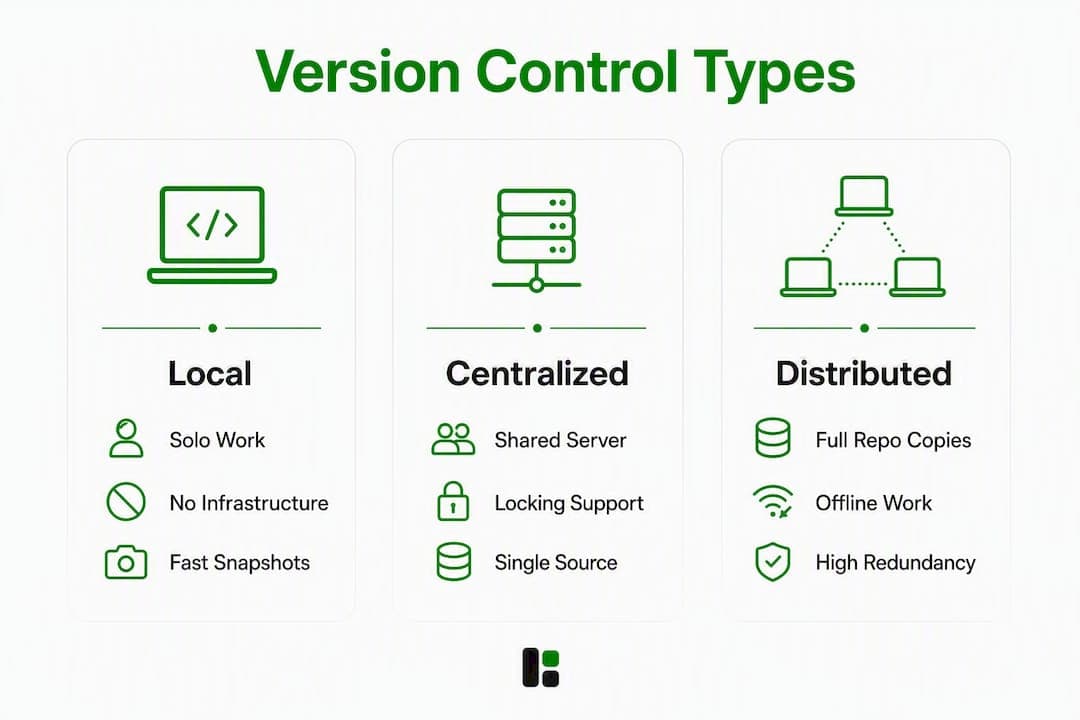
Version control architectures fall into three types: local, centralized, and distributed. Each makes different tradeoffs for binary-heavy creative work.

Local systems store version history on a single machine. Simple, fast, and zero infrastructure. The problem: no collaboration, no offsite backup, and one disk failure ends everything. Useful only for solo work or quick personal snapshots.
Centralized systems use a single server that all clients check out from. The server is the single source of truth. This model handles file-locking well because the server arbitrates who has a file checked out. Large studios editing heavy binaries often prefer this because locking is built into the model. The tradeoff is a single point of failure and limited offline capability.
Distributed systems give every client a full copy of the repository history. Offline work is possible, and redundancy is built in by default. The challenge for binary assets is storage: duplicating a full history of large files across every client is expensive. Git LFS (Large File Storage) addresses this by storing binary content on a remote server while keeping lightweight pointers in the local repo.
| Dimension | Local | Centralized | Distributed |
|---|---|---|---|
| Best for / use case | Solo work, quick snapshots | Large binary studios, game dev | Remote teams, mixed text/binary |
| File handling | Any, no size enforcement | Binary-optimized with locking | Text-native; binaries via LFS |
| Locking & branching | None | Native locking, limited branching | Branching-first; locking via extensions |
| Collaboration model | None | Single server, serialized edits | Peer-to-peer, parallel workflows |
| Integrations | Minimal | CI/CD, DAM, design tools | CI/CD, DAM, design tools, APIs |
| Storage & cost | Local disk only | Centralized server, predictable | Distributed + LFS storage costs |
For creative teams, the practical choice usually comes down to two: centralized (if binary files dominate and locking is critical) or distributed with LFS (if the team is remote and the asset mix includes both code and media).
Tools that handle asset versioning and where they fit
The tool space breaks into four classes. Knowing which class fits your workflow saves weeks of evaluation.
Git + Git LFS is the default starting point for teams already in a software development workflow. Git handles text and code natively; Git LFS offloads binary files to remote storage while keeping the familiar Git interface. It works well for smaller binary sets and teams comfortable with the command line. The constraint is cost at scale: LFS storage and bandwidth fees add up quickly for large video or 3D asset libraries.
Unity Version Control (formerly Plastic SCM) is built for game and interactive media development, where assets and code live in the same repository. It supports both centralized locking and distributed workflows, and it versions Unity-specific metadata and import settings alongside the asset files themselves. Import settings and project-specific overrides must be part of the versioned payload to avoid broken restores — Unity's tooling makes that the default rather than an afterthought.
Perforce Helix Core is the enterprise standard for large binary repositories. Game studios, film production houses, and automotive design teams use it because it handles multi-gigabyte files and thousands of concurrent users without the performance degradation that plagues Git at that scale. Helix DAM extends this with webhooks, CLI/API automations, and integration with issue trackers or CI/CD pipelines, turning version history into an active workflow trigger. The tradeoff is cost and operational complexity.
Bynder sits on the DAM side of the spectrum. A DAM stores a single approved version, enforces permissions and approvals, and tracks versions so teams always use brand-approved files. Bynder adds metadata-driven governance, approval workflows, and rights management on top of version history. It's the right tool when governance and brand consistency matter more than pipeline-level version control. The constraint: it's not a replacement for a VCS in engineering-adjacent workflows.
The key distinction: file storage tools like Google Drive keep files. A DAM governs them — metadata, taxonomy, approval workflows, and rights management are what separate DAM from generic storage. For creative teams, that governance layer is where most of the value lives.
Quick reference by use case:
- Unity Version Control — game dev, interactive media, Unity-based pipelines
How to choose the right approach for your team
Start with your file profile, not your tool preferences. The answers to a handful of questions will narrow the field faster than any feature comparison.
Decision checklist:
- What file types dominate your library? (Images, video, 3D, PDFs, mixed)
- What are your largest individual files and total repository size?
- Is your team co-located or distributed across time zones?
- Do you need branching (parallel campaigns) or locking (serialized binary edits)?
- Does metadata need to be versioned alongside assets?
- What integrations are required? (DAM, CI/CD, design tools, social publishing)
- What are your retention and compliance requirements?
- What is your storage cost tolerance? (Hot vs. archival, egress fees)
Vendor questions worth asking directly:
- "Do you version metadata and import settings alongside the asset file?"
- "How do you handle large binary diffs — do you store deltas or full copies?"
- "What locking or checkout model do you support, and how do conflicts surface to users?"
- "What does storage cost at 5TB, 20TB, and 100TB?"
- "Can version events trigger webhooks or CI/CD pipelines?"
Sizing heuristics help too. Teams with fewer than 50GB of binary assets and a software-adjacent workflow usually start with Git + Git LFS and outgrow it around the 100–500GB mark, where Perforce or a dedicated DAM becomes more cost-effective. Marketing-focused teams with governance requirements often skip the VCS layer entirely and go straight to a DAM like Bynder. Game studios and film teams almost always land on Perforce or a similar centralized system from the start.
Practical workflows every creative team should adopt
A reliable asset versioning workflow follows a consistent lifecycle. Here is the pattern that scales from a five-person marketing team to a hundred-person studio.
1. Author with a clear naming baseline. Use semantic version labels (v1.0, v1.1) or automated numbering from day one. Never rely on filename suffixes like "Final" or "APPROVED" — those are naming conventions that break the moment a second person touches the file.

2. Check in with metadata. Every commit or upload should include at minimum: asset type, campaign or project tag, author, and status (draft/review/approved). Versioned metadata avoids broken restorations when rolling back assets — if you restore v1.2 of a video but the import settings from that era are gone, the restore is incomplete.
3. Lock binaries before editing. For any binary file, check it out (lock it) before opening it in an editor. This is the single most effective way to prevent overwrite conflicts. Distributed teams sometimes skip this step because locking feels slow — it isn't, and the alternative is data loss.
4. Route through a review/approval state. Assets should not move from "in progress" to "published" without a discrete approval step. Most DAMs and enterprise VCS tools support this natively. If yours doesn't, a webhook into your project management tool (Jira, Linear, Asana) achieves the same result.
5. Freeze on approval. Automating state transitions from unfrozen (editable) to frozen (approved) eliminates human-error naming traps and is a core practice for scaling creative workflows. A frozen asset is read-only. Any change requires a new version, not an overwrite.
6. Archive or retire on expiry. Rights-managed assets, seasonal campaigns, and deprecated brand materials need an explicit retirement state. Move them to archival storage, strip active permissions, and log the retirement date.
7. Wire version events into your pipeline. Webhooks, CLI/API automations, and integration with issue trackers or CI/CD pipelines automate moving assets from draft to published states. A version event that triggers a downstream render or a Slack notification is infinitely more reliable than a manual handoff.
Pro Tip: Version your metadata import settings as a separate artifact alongside the asset. If you ever need to restore a video to its v1.0 state, the import settings from that version are what make the restore actually work in the target application.
Pro Tip: Use content-addressed storage (where the file's hash is its identifier) to deduplicate large binaries. Two campaigns that use the same hero image don't need two copies stored.
Pro Tip: Instrument version events for analytics. Knowing how many times an asset was revised before approval, or how long assets spend in review, surfaces bottlenecks you can't see any other way.
Implementing asset version control: migration checklist and timeline
Migration from a shared drive or ad-hoc folder structure to a proper versioning system takes 4–12 weeks depending on archive size and integration complexity. Here is a realistic phased plan.
Migration checklist:
- Audit asset types and sizes. Catalog what you have: file types, total volume, oldest assets you need to retain, and which assets are actively used vs. archived.
- Export current metadata. Before migrating, extract whatever metadata exists (even if it's just filenames and folder paths). This becomes your baseline taxonomy.
- Choose a retention baseline. Decide how many historical versions to migrate. Migrating everything is rarely worth the cost; migrating the current version plus the last two or three approved versions covers most rollback needs.
- Pilot with a single campaign or asset set. Don't migrate everything at once. Pick a bounded set, run it through the new system end-to-end, and validate that locking, metadata, and approval states work as expected.
- Migrate core repository. Move latest versions and key historical versions. Configure locking rules and role-based permissions at this stage.
- Integrate with pipelines. Connect version events to your CI/CD, DAM, or publishing tools. Test webhooks and automation triggers before going live.
- Train users. A system nobody uses correctly is worse than no system. Focus training on the check-out/lock workflow and the approval state transitions — those are where human error concentrates.
- Cut over to production. Retire the old shared drive. Keep it read-only for 30 days as a safety net, then archive or delete.
Typical timeline:
- Weeks 1–2: Audit, metadata export, architecture decision, tool selection
- Weeks 3–4: Pilot with one campaign or asset set, validate workflow
- Weeks 5–8: Migrate core repository, configure permissions and locking
- Weeks 9–10: Integrate automations, test pipeline triggers
- Weeks 11–12: User training, production cutover, old system retirement
What lengthens the timeline: large archives (>1TB), custom integrations with legacy tools, and organizations with complex approval hierarchies. Budget for archival vs. hot storage costs, LFS bandwidth fees, and any cloud egress charges from your current storage provider.
What practitioners actually do: patterns from the field
The gap between theory and practice in asset versioning is mostly about where teams draw the line between a DAM and a VCS. Most mature creative operations use both, with clear ownership: the DAM governs approved, published assets; the VCS handles the pipeline that produces them.
Teams using Git + Git LFS for smaller binary sets typically keep design source files (Figma exports, Illustrator files, short video clips) in LFS while code and configuration stay in standard Git. This works well up to a few hundred gigabytes. Past that, egress and storage costs push teams toward a dedicated solution.
Studios editing large binaries — game assets, film footage, high-resolution photography — almost universally choose centralized locking. The reason is straightforward: when a single asset file is 2GB, you cannot afford to discover a conflict after the fact. Perforce-style check-out/lock workflows serialize edits by design.
The pattern that holds across team sizes: DAM for governance, VCS for pipeline resilience. Use the DAM as the single source of truth for approved assets; use the VCS to manage the production workflow that feeds it. Trying to make one tool do both usually means it does neither well.
Unity's approach to asset versioning is instructive for any team working with engine-driven content. Unity Cloud's asset versioning documentation emphasizes versioning metadata and import settings alongside asset files — not just the files themselves. That principle applies beyond game development: any asset that gets processed or rendered by a downstream tool needs its configuration versioned alongside it.
The automation pattern is where most teams leave value on the table. Integrating version events with ticketing and CI via webhooks and CLI/API turns a passive history store into an active workflow engine. An approval event that auto-publishes to a CDN, or a freeze event that triggers a downstream render, eliminates entire categories of manual handoff error. Teams that wire these connections early report the most consistent brand output.
Key Takeaways
Effective asset version control combines versioned metadata, file-locking for binaries, automated state transitions, and pipeline integrations — teams that implement all four recover significant time and eliminate the most common brand consistency failures.
| Point | Details |
|---|---|
| Audit before you migrate | Catalog file types, sizes, and retention needs before choosing a tool or architecture. |
| Lock binaries, always | File-locking prevents overwrite conflicts that merging cannot resolve for binary formats. |
| Version metadata too | Import settings and project overrides must be versioned alongside assets for restores to work correctly. |
| Automate state transitions | Automated freeze/unfrozen workflows eliminate naming traps and scale better than manual conventions. |
| Assets dev for marketing assets | For templated, brand-aligned marketing outputs, assets dev provides versioned rendering via CLI, API, and MCP integrations. |
The case for metadata-first thinking
Most teams implement version control backward. They pick a tool, migrate files, and then wonder why restores don't behave as expected or why brand consistency still breaks down. The tool is rarely the problem. The missing piece is almost always metadata.
Metadata is what makes a version meaningful. A file stored as "v1.2" with no context is just a file. The same file tagged with campaign, approval status, rights expiry, and import settings is an asset you can actually govern. DAM solutions enforce permissions and manage digital rights through customizable roles and expiration dates — but only if the metadata is there to enforce against.
The second thing teams underestimate is automation. Manual state transitions — someone remembering to rename a file or move it to an "approved" folder — fail at scale. The teams with the most consistent brand output are the ones that treat version events as workflow triggers, not just archive entries. A freeze event that auto-publishes, a rights-expiry flag that auto-retires, a new version that auto-notifies the downstream team: these are not advanced features. They are the baseline for any creative operation running more than a handful of campaigns simultaneously.
For marketing teams specifically, the fastest path to consistent versioned outputs is often not a full VCS implementation but a templated asset platform with built-in versioning and pipeline integrations. That's where the architecture decision gets practical rather than theoretical.
When assets dev is the faster path to versioned marketing assets
Perforce, Git LFS, and Bynder are the right answers for engineering-adjacent pipelines and large binary repositories. For marketing teams whose primary output is brand-aligned images, videos, and PDFs for LinkedIn, Instagram, Google, X, and Substack, those tools introduce more infrastructure than the problem requires.
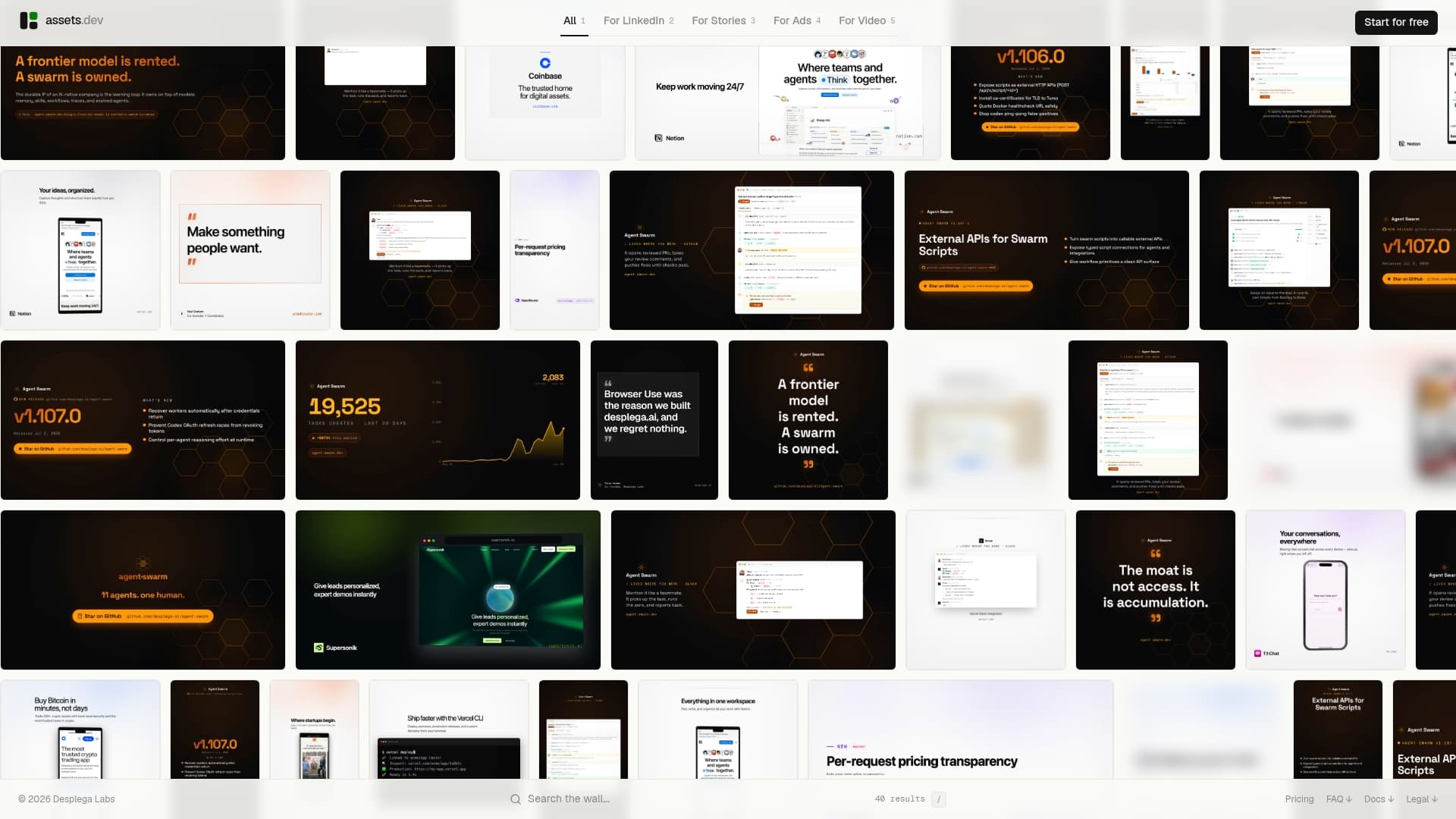
assets dev is built for exactly that use case: curated, high-quality templates that the platform adapts to your branding in seconds, with rendering outputs that integrate directly into automated growth workflows via CLI, API, and MCP. Every render is a versioned output. Every template is a controlled, brand-safe starting point. You get the governance benefits of versioned asset production without standing up a VCS or DAM from scratch.
The free plan covers up to 10 videos or 100 image renderings with no credit card required. In July, that free allocation increases to 1,000 credits. The pro plan is €9 per month. If your team needs to pilot a versioned, automated marketing asset workflow before committing to a full DAM implementation, start with the free plan at assets.dev and see how far templated automation takes you.
Useful sources
These are the primary references used throughout this guide, ordered by authority:
- Git — About Version Control: the canonical reference for VCS architecture types (local, centralized, distributed) and the core rationale for version control beyond simple backup.
- What is version control — Atlassian: clear explanation of VCS vs. SCM terminology and how DAM-based asset versioning fits the broader version control model.
- Asset Versioning — Unity Cloud Documentation: the most detailed publicly available treatment of binary asset versioning, metadata requirements, freeze/unfrozen states, and import settings versioning.
- Digital Asset Management — Microsoft: practical overview of DAM capabilities including version control, permissions, rights management, and centralized storage.
- Digital Asset Management — Wikipedia: useful for the relationship between DAM systems and version control as a broader category.
FAQ
What is asset versioning?
Asset versioning is the practice of tracking every revision of a digital file, storing its history, and enabling rollback to any prior state. In creative workflows, it typically includes metadata, approval states, and file-locking alongside the version history itself.
What are the three types of version control?
The three types are local (history stored on a single machine), centralized (history on a shared server that clients check out from), and distributed (every client holds a full copy of the history). Centralized systems suit binary-heavy creative workflows because they support native file-locking; distributed systems suit remote teams needing offline resilience.
What is the difference between VCS and SCM?
VCS (version control system) and SCM (source control management) refer to the same category of tools and are used interchangeably in software development. In creative and marketing contexts, the same functionality is usually called "asset versioning" and is embedded in DAM platforms rather than standalone VCS tools.
What are the four types of digital assets?
Definitions vary by industry, but a common breakdown covers images (photos, illustrations, logos), video and audio files, documents and PDFs, and design source files (layered PSDs, AI files, Figma exports). Each type has different versioning requirements, with video and 3D files posing the greatest challenge due to binary size and the impossibility of line-based merging.
Can assets dev work as part of a versioned marketing asset pipeline?
Yes. assets dev supports CLI, API, and MCP integrations, so rendered outputs (images, videos, PDFs) can be wired directly into automated pipelines. Each render is a versioned, brand-aligned output that fits into a broader asset version control workflow without requiring a separate VCS or DAM for the templated production layer.