Field note
Choose the Right PDF Generation API for Your Team
Discover how a template-driven PDF generation API can streamline workflows, enhance document editing, and produce flawless outputs for your team.
For most developer teams, the right call is a template-driven, API-first PDF generation approach. It separates layout from code, so marketing and ops can edit documents without filing a pull request, and it produces the same pixel-perfect output every time. For marketing-heavy PDFs like proposals, campaign reports, and branded one-pagers, Assets.dev fits that model directly, pairing curated templates with an API and CLI built for automated workflows like those detailed in Founder Campaigns.
HTML-to-PDF still earns its place for one-off pages or complex third-party content you can't easily model as structured data.
- Invoices, labels, certificates: template-driven JSON rendering
- Marketing decks, campaign reports, branded one-pagers: template-driven with visual editing
- Arbitrary web pages or embedded third-party content: HTML-to-PDF
Pro Tip: Lock a template_id contract before you write a single line of render code. A stable field schema is what makes retries safe and idempotent when a render call times out.
Key Takeaways
Template-driven, API-first PDF generation delivers deterministic output and lets non-developers safely edit layouts, making it the stronger default over HTML-to-PDF for repeatable business documents.
| Point | Details |
|---|---|
| Default to template-driven rendering | Use JSON plus a visual editor for invoices, reports, and marketing PDFs; reserve HTML-to-PDF for one-off arbitrary pages. |
| Lock the template contract early | A stable template_id schema prevents partial renders and makes retries safely idempotent. |
| Estimate cost from real usage | Run a 30-day pilot to measure actual pages per document before committing to a pricing tier. |
| Check security signals directly | Ask vendors about ISO 27001, SOC 2, HIPAA, GDPR terms, and PDF/A support before handling sensitive documents. |
| Choose Assets.dev for marketing PDFs | Its curated templates, API/CLI access, and brand-aware rendering fit campaign and growth documents specifically. |
Table of Contents
- What Is a PDF Generation API and Why Do Teams Use One?
- Core Features to Expect From a Modern PDF Generation API
- Template-Driven vs. HTML-to-PDF vs. Fillable Forms: Which Fits?
- What SDKs and Integrations Should You Check Before Committing?
- How Does a Typical PDF API Request and Response Work?
- How Much Does a PDF Generation API Cost?
- What Security and Compliance Standards Matter for Generated PDFs?
- What Throughput and Performance Should You Plan For?
- What Should You Ask Before Choosing a PDF API Vendor?
- How Do You Render Your First PDF From a Template?
- Why Assets.dev Fits Marketing-Focused PDF Generation
- What Experienced Teams Learn the Hard Way About PDF Pipelines
- Get Started With Assets.dev for Automated PDF Generation
- Where to Read More on PDF Standards and Vendor Reviews
- Sources
- FAQ
What Is a PDF Generation API and Why Do Teams Use One?
A PDF generation API takes structured input (JSON, a template, or HTML) and converts it into deterministic PDF output on demand, no browser window, no manual export. The standard industry term for this capability is server-side PDF generation or dynamic PDF API, and you'll see both used interchangeably with "PDF generation API" across documentation and vendor sites.
Teams adopt one for three reasons:
- Reliability — the same input always produces the same output, which matters when a customer invoice has to look identical every month.
- Offloaded infrastructure — you stop maintaining a fleet of headless browsers or wrestling with print CSS.
- Non-developer editing — marketing or ops can update a template's layout without touching backend code.
Common use cases span invoices, shipping labels, certificates, sales proposals, campaign performance reports, and event tickets. A production-grade API generally supports PDF/A for archival needs, batch generation for high volume, and embedded fonts covering multilingual scripts, since a certificate generator that breaks on accented characters isn't one you can ship.
Core Features to Expect From a Modern PDF Generation API
Feature parity across vendors is closer than the marketing pages suggest, but the details matter. Screen candidates against this baseline:
- A visual, WYSIWYG template editor with a stable
template_idcontract, so the field schema doesn't shift under you between releases - JSON-to-template rendering as the primary model, with HTML-to-PDF or hybrid support for edge cases
- Output modes: inline binary, hosted URL, or base64 encoding, depending on how your app consumes the file
- Font embedding and multilingual coverage, including CJK, Devanagari, and Arabic scripts, plus PDF/A and PDF/X support for archival and print workflows
- Barcode and QR code generation, image and table embedding, precise page coordinates, custom metadata, and PDF security settings like password protection
- Official SDKs, webhooks for async jobs, batch endpoints for volume, and a sandbox or playground where you can test payloads before writing code
Vendor review pages consistently flag template editors and ease of integration as the top purchase drivers, ahead of raw feature count. That tracks with what actually breaks projects: not missing features, but clunky editors that force a developer to touch every layout tweak.
Template-Driven vs. HTML-to-PDF vs. Fillable Forms: Which Fits?
Three rendering models dominate this space, and picking the wrong one is the most common mistake teams make early on.
Template-driven (JSON + visual editor) works best for repeated, structured documents: invoices, reports, certificates. You get deterministic output, a stable schema, and the ability to hand template edits to a non-developer. This is the model teams report saving the most engineering time on, since layout changes move out of backend code and into a dashboard.
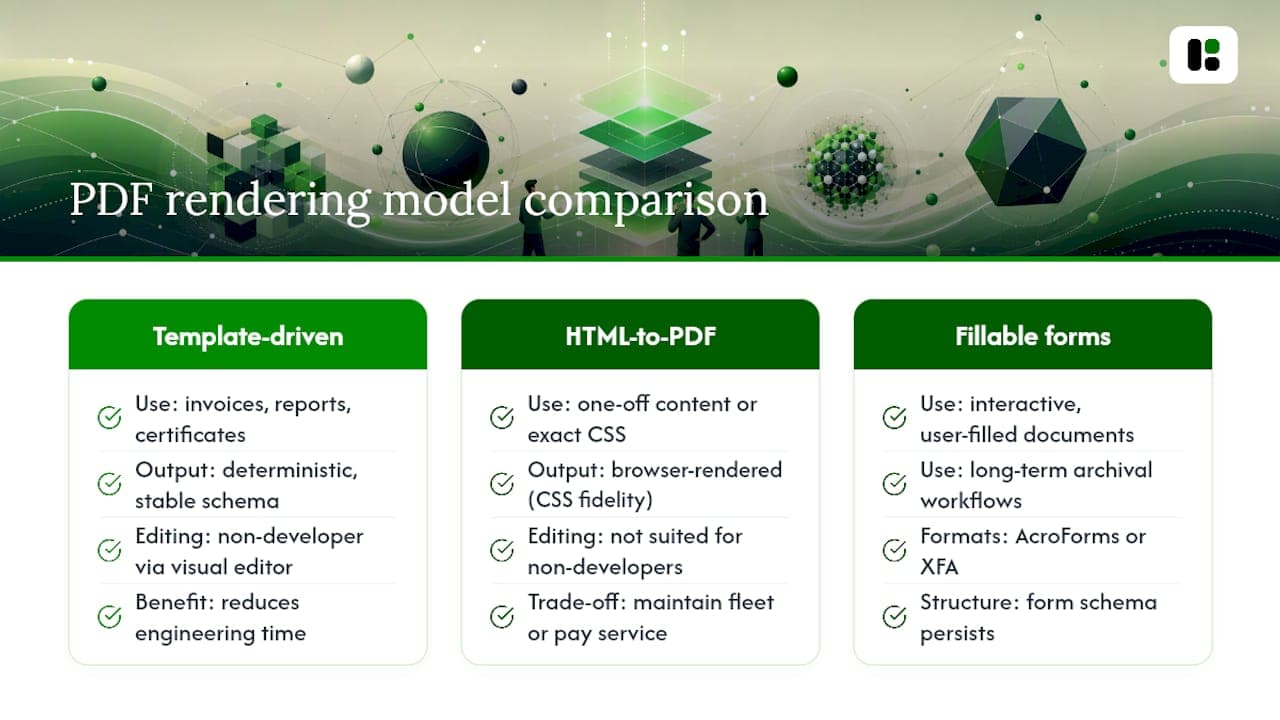
HTML-to-PDF (browser rendering) makes sense for one-off arbitrary content or when you need exact CSS fidelity from an existing web page. The trade-off is real: you're now maintaining a browser fleet or paying a managed service to do it, and testing gets harder because rendering can shift with browser updates.
Fillable PDF forms (AcroForms or XFA) suit interactive documents an end user fills out themselves, plus long-term archival workflows where the form structure itself needs to persist.
Pro Tip: Default to template-driven for marketing and transactional documents. Reserve HTML-to-PDF for the rare case where you're recreating a web page you don't control and can't model as data.
What SDKs and Integrations Should You Check Before Committing?
The developer experience determines whether integration takes an afternoon or a sprint. Look for:
- Official SDKs and sample clients for Node, Python, Ruby, Go, and Java, not just a raw REST reference
- A stable API contract:
template_idschemas, clear versioning, and backward-compatible field additions - Integrations with Zapier, Make, CRMs, marketing automation platforms, and CI/CD pipelines
- A playground with sample payloads so you can test a render before writing integration code
- Webhooks and async job-status endpoints, with retry and idempotency patterns built in for production reliability
Buyer reviews on platforms like Software Advice repeatedly cite sandbox access and documentation quality as deciding factors, often ahead of price. If you're already automating marketing output, a PDF API that plugs into the same marketing automation and CRM stack you use for other assets saves a second integration effort entirely.
How Does a Typical PDF API Request and Response Work?
Most APIs expose a small, predictable set of endpoints. Understanding the sequence up front saves a lot of trial and error.
- Create and publish a template, either in a dashboard or via the API, and lock its
template_id. - Send a render request: an auth header, the
template_id(or a raw JSON document description), any image assets, and your desired output mode. - Receive either a synchronous PDF binary or, for larger jobs, an async job ID with a webhook callback once rendering completes.
- Store or serve the returned file, ideally via a signed, short-lived download URL rather than a permanent public link.
Some APIs, like gPdf's JSON Render model, skip a browser entirely and build the PDF from a structured DocumentRequest describing pages, text, images, and barcodes directly. That approach tends to be faster and more predictable than spinning up headless Chrome for every request.
Operationally, treat every render call like you would any critical API call: attach a request ID, set a sane timeout, make retries idempotent, and only persist PDFs you actually need to keep. Skipping this is how teams end up debugging "missing invoice" tickets at 2 a.m.
How Much Does a PDF Generation API Cost?
Pricing generally falls into one of four shapes: per-page, per-render (a flat rate per PDF regardless of length), credit bundles you draw down, or flat subscription tiers with overage rates once you exceed volume.
Hidden costs show up fast if you're not watching for them:
- Embedding high-resolution images or many images per document
- OCR processing on scanned inputs
- Converting to PDF/A for archival compliance
- Overage rates once you blow past a tier's included volume
Run this against real numbers before you commit, not against a sales deck's example.
Enterprise buyers can often negotiate committed-volume discounts or reserved capacity for burst traffic, but that leverage only exists once you have actual usage data.
Pro Tip: Run a 30-day pilot at expected volume before locking into an annual tier. It's the only reliable way to see your true average page count and render time.
What Security and Compliance Standards Matter for Generated PDFs?
Documents like invoices, contracts, and medical forms carry real liability if handled carelessly, so the security posture of your PDF API isn't a checkbox exercise.
Look for transport and at-rest encryption, signed URLs for downloads, and token-based access with short expiration windows. On the compliance side, ask directly whether the vendor holds ISO 27001 or SOC 2 certification, and whether they offer HIPAA-eligible processing or a GDPR data-processing agreement if you're handling EU personal data.
PDF-specific controls matter too: PDF/A support for anything that needs long-term archival integrity, redaction capability for sensitive fields, clean metadata handling, and audit logs you can hand to a compliance team on request.
A vendor that can't clearly explain how long they retain generated PDFs, how deletion requests are handled, and what happens to embedded images after rendering isn't ready for regulated document types. Ask before you integrate, not after an audit.
Rate limits per API key and secure storage for any images you upload for embedding round out the operational basics.
What Throughput and Performance Should You Plan For?
Before scaling past a proof of concept, know the metrics that actually predict trouble: renders per second, average render latency, concurrent job capacity, and peak burst throughput.
- Use batch endpoints and background workers for bulk jobs instead of firing hundreds of synchronous requests
- Expect concurrency throttles and rate limits; design your queue to absorb backpressure gracefully
- Track p50 and p95 latency separately, since a fast median with a slow tail means someone's invoice is stuck
- Set error-rate alerts and trace each request ID from submission through to the returned PDF
A vendor that publishes real throughput numbers and lets you test them in a sandbox is telling you more than one that just claims "enterprise scale" on a landing page.
What Should You Ask Before Choosing a PDF API Vendor?
Run through this checklist, roughly in priority order:
- Template and editor quality — can a non-developer actually use it, or does every change route back to engineering?
- API contract stability — how are breaking changes to
template_idschemas handled and communicated? - SDK coverage — official libraries for your stack, not just a generic REST wrapper
- Pricing predictability — can you model cost confidently at 10x your current volume?
- Security certifications — ISO 27001, SOC 2, HIPAA, GDPR terms, matched to your actual regulatory exposure
- Support SLA — response times that match how critical these documents are to your business
On a vendor call, ask directly for sandbox access, sample payloads, maximum concurrency limits, regional endpoint availability, and what happens during a regional outage.
Red flags worth walking away from:
- No documented
template_idcontract or versioning policy - No free tier or sandbox, meaning you can't test before paying
- No official SDKs, just a bare API reference
- Pricing that requires a sales call to even estimate
Match the vendor's actual strength to your document type. A vendor built for invoice-heavy fintech workflows and one built for marketing collateral solve overlapping but different problems, and the wrong fit shows up six months in, not on day one.
How Do You Render Your First PDF From a Template?
The fastest path to a working integration:
- Create a template in the dashboard, or define one via the API if you prefer code-first workflows.
- Publish it and note the
template_id. - Send a
POSTrequest to the template-render endpoint with your JSON data payload, any image assets, and your auth token. - Handle the response: either an
application/pdfbinary directly, or a job ID paired with a webhook callback for larger documents.
A minimal request typically needs just the template_id, a data object matching your schema, and an array of asset URLs for images. Test with a sandbox API key and the preview UI before pointing production traffic at it.
For error handling, expect standard HTTP status codes: 400 for schema mismatches, 401 for auth failures, 429 for rate limiting. Build exponential backoff into your retry logic for 429 and 5xx responses, and log the request ID on every failure so support can trace it.
Why Assets.dev Fits Marketing-Focused PDF Generation
If your PDF volume is mostly marketing collateral, sales proposals, and campaign reports rather than high-volume transactional documents, Assets.dev is built around exactly that use case. It pairs a curated library of marketing templates with API, CLI, and MCP access, so the same brand-aware rendering you'd use for a one-off design also runs unattended in a CI pipeline or growth automation flow.
The platform learns your branding, colors, fonts, and logo placement, in seconds, and applies it automatically across generated assets. That matters when marketing wants five branded proposal variants by end of day and nobody wants to touch a design file.
- Stable
template_idworkflow for repeatable, script-driven rendering - CLI and API access for teams that want PDFs inside an existing automation stack
- A generous free plan (no credit card required) for testing before committing to production volume
- Curated templates focused specifically on campaign and growth assets, not on generic document layouts
What Experienced Teams Learn the Hard Way About PDF Pipelines
Layout drift is the quiet failure mode: a template that renders perfectly in testing breaks six weeks later because a font fallback silently swapped, or a CDN-hosted image started returning intermittent 404s. Neither shows up in a code review.

The fix isn't more testing, it's validating data server-side before the render call fires, so a malformed payload never reaches the renderer and produces a half-finished PDF. Lock the template contract early and treat any schema change as a versioned event, not a quiet edit.
The underrated move is giving design and ops a safe visual editor instead of routing every template tweak through a developer. It cuts turnaround time and, more importantly, it stops your engineers from becoming a bottleneck for someone else's campaign deadline.
Get Started With Assets.dev for Automated PDF Generation
Assets.dev is the practical route for teams that need marketing-grade PDFs without building and maintaining rendering infrastructure from scratch. Instead of stitching together a headless browser fleet or hand-coding layout logic, you work from curated templates that already understand brand consistency, and push output through an API, CLI, or MCP integration that fits directly into an existing growth workflow.
What you get: brand-aware rendering that adapts to your logo and colors automatically, a template library built specifically for campaign assets rather than generic documents, and pricing that stays predictable as you scale, a free plan with no credit card required, and a single paid tier at $9 per month once you outgrow it. Through July, new accounts get 1,000 credits instead of the usual 100.
To get started, create a free account, pick a template from the library, publish its template_id, and send your first POST render request from your backend or CI pipeline. You'll have a working PDF before the coffee gets cold.
Where to Read More on PDF Standards and Vendor Reviews
- PDF/A standard for archival format requirements
- Capterra reviews and Software Advice profiles for buyer feedback on vendors
- Assets documentation and playground for template-driven generation
Sources
- PDF Generator API reviews — Capterra
- PDF/A standard — PDF Association
- PDF Generator API profile — Software Advice
FAQ
Is the Adobe PDF API free?
Adobe's PDF Services API offers a limited free trial tier with usage caps, then moves to paid, volume-based pricing once you exceed it. Most production use requires a paid plan.
Is the PDF Generator API open source?
Some PDF rendering libraries are open source (like wkhtmltopdf or WeasyPrint), but hosted "PDF generation API" services are typically commercial products with proprietary infrastructure, even when they offer a free tier.
Is there a free PDF generator?
Yes. Several vendors, including Assets.dev, offer a free plan with capped usage, no credit card required, which is enough to test template design and API integration before committing to a paid tier.
Which tool is best for PDF generation?
It depends on your document type: template-driven APIs like Assets.dev suit marketing and business documents best, while HTML-to-PDF services fit teams converting arbitrary web pages. Match the tool to your actual use case rather than picking on feature count alone.