Field note
Content Repurposing Automation for Content Marketers
Discover how content repurposing automation can save time, boost reach, and maintain brand voice across channels seamlessly.
Content repurposing automation is the use of AI and rule-based pipelines to turn one piece of source content into multiple channel-ready formats automatically, without a human rebuilding each version by hand. It saves hours per week, extends reach across platforms, and (if you set it up right) keeps your brand voice consistent everywhere it shows up.
Which approach fits your team?
- Non-technical or small teams: Start with a template-driven SaaS platform like Assets that learns your brand and renders assets on demand.
- Developer-led or high-volume teams: Go API-first, wiring a repurposing engine directly into your CMS and scheduling stack.
Key Takeaways
Content repurposing automation works best when template rendering, transformation logic, and scheduling are treated as separate, composable layers rather than one monolithic tool.
| Point | Details |
|---|---|
| Match architecture to team type | Non-technical teams should start with template SaaS; developer teams benefit more from API-first builds. |
| Follow the five-stage pipeline | Trigger, extract, transform, route, and measure form the backbone of any reliable workflow. |
| Guard rails prevent spam | Auto-stop rules and approval queues stop over-automation from damaging brand trust. |
| Composability beats all-in-one at scale | Pairing an API engine with a template renderer and scheduler outperforms rigid single-vendor tools past a few channels. |
| Assets.dev fits the template layer | Its CLI/API/MCP integrations let teams render on-brand assets inside a larger automated pipeline, starting on a free plan. |
Table of Contents
- What Is Content Repurposing Automation?
- What Features Actually Matter in an Automation Workflow?
- How Do You Build an Automated Repurposing Workflow?
- Dashboard SaaS vs. API-First: Which Architecture Fits?
- Which Tooling Category Fits Your Stack?
- How Do You Choose the Right Approach for Your Team?
- What Do Real Repurposing Pipelines Look Like?
- What's the Implementation Checklist and Common Pitfalls?
- Sources
- FAQ
What Is Content Repurposing Automation?
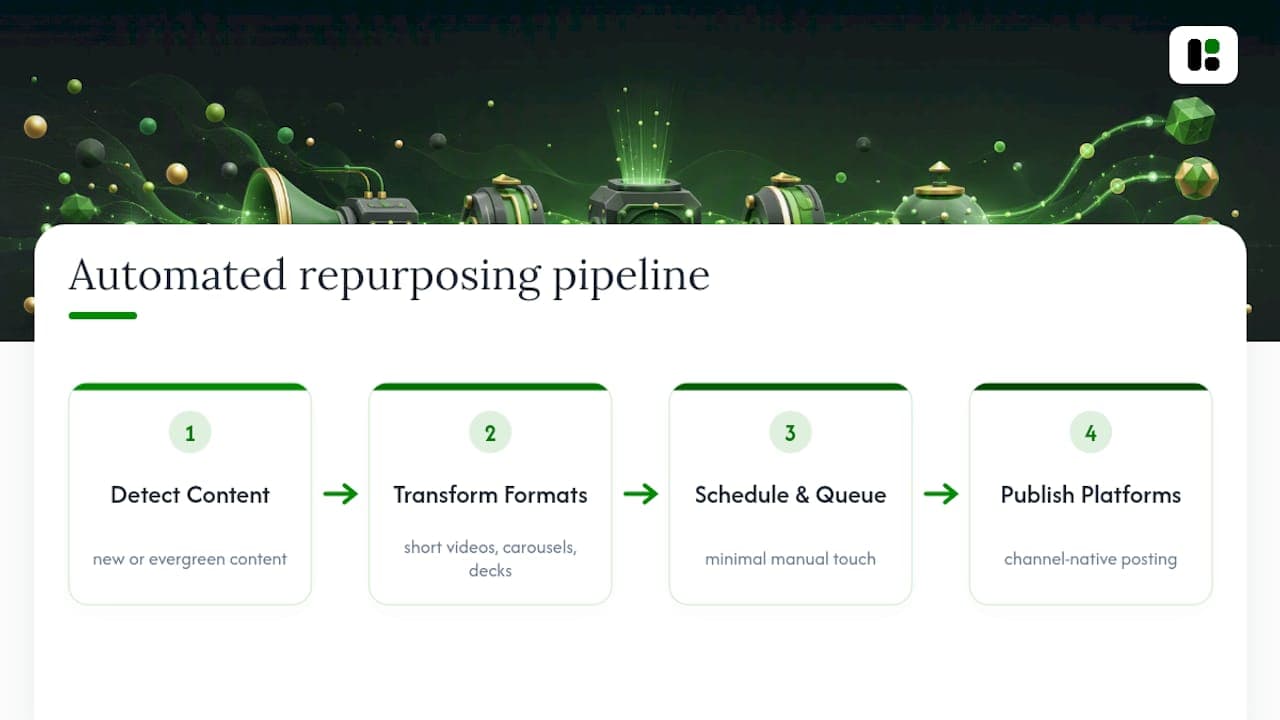
Automatic content repurposing uses AI to convert one finished piece of content, a blog post, webinar, or podcast, into channel-native formats like short videos, social carousels, and slide decks, according to industry guides on AI-powered repurposing. The goal isn't just saving time. It's making sure your best ideas show up where your audience actually spends attention, in a format native to that platform, without a designer rebuilding the same graphic five times.
The term "content repurposing" gets thrown around loosely. What most marketers actually mean, and what this article covers, is automated multi-format content distribution: a pipeline that detects new or evergreen content, transforms it, and pushes it live across channels with minimal manual touch. Some call this "content recycling," others "content automation." They're the same discipline wearing different labels.
What Features Actually Matter in an Automation Workflow?
Most platforms in this space advertise "automation" as a headline feature. Fewer of them tell you what actually happens under the hood, and that's where teams get burned. Before you commit to a tool or brief an engineer to build one, confirm it covers these five areas.
- Triggers, transforms, destinations, scheduling. The pipeline needs a clear event that kicks things off (a new blog publish, a manual queue entry, an evergreen-content flag), a transformation step, and a scheduling layer that pushes to the right destination at the right time.
- Format and channel coverage. Can it produce video clips, LinkedIn carousels, X threads, PDF one-pagers, and newsletter blurbs, or just one of these? Most tools specialize; few do all of it well.
- Brand voice memory and asset rendering. The platform should store your tone, color palette, and layout preferences once, then apply them automatically to images, videos, and PDFs without you re-uploading brand guidelines every time.
- Review hooks and guard rails. Look for approval queues, engagement-based auto-stop rules, and cadence limits so the system doesn't spam the same evergreen post daily. Practical recycling tools increasingly build this in by default, as OwlStack's recycling feature set shows.
- Analytics feedback. Does it track which repurposed format actually drives clicks, so you can retire formats that flop?
Pricing models matter more than they seem at first glance. A per-seat SaaS plan scales differently than a per-render or credit-based model, and the difference compounds fast once you're producing dozens of assets weekly.
Pro Tip: Before evaluating any tool, count how many distinct formats your team currently repurposes into by hand. If it's fewer than three, a template-first platform will get you further, faster, than a custom API build.
How Do You Build an Automated Repurposing Workflow?
A reusable pipeline for content repurposing automation follows the same five stages regardless of whether you're using a dashboard tool or writing your own code, according to practical guides on automating content repurposing. Here's how each stage plays out in practice.
- Identify the source and the trigger. Decide what counts as a "publish event": a new blog post going live, an evergreen post crossing a re-share threshold, or a manual add to a content queue. Most teams start with new-publish triggers because they're the easiest to wire up.
- Extract and normalize. Pull the transcript (for video or audio), strip formatting, and tag metadata like topic, target platform, and key quotes. This step is where messy source content becomes machine-readable.
- Transform. This is where AI earns its keep. Summarization, re-angling for a different platform's tone, and templating happen here. Field research from Optimizely found AI can cut this step from hours to minutes, generating platform-specific drafts and short-form video clips directly from long-form source material.
- Route and schedule. Webhooks or API calls push the transformed asset to its destination, whether that's a CMS draft, a social scheduling queue, or a newsletter platform. This is also where template renderers like Assets.dev plug in via CLI or API to generate the final branded image or video.
- Measure and feed back. Attach UTM parameters, track engagement per format, and build an auto-stop rule that pauses underperforming content types instead of continuing to burn credits on formats nobody clicks.
Pro Tip: Run steps 1 through 4 manually for your first five pieces of content before automating anything. You'll spot which transformation step actually needs human judgment, and which one is pure busywork ready for a script.
Dashboard SaaS vs. API-First: Which Architecture Fits?
The architecture you pick determines how much control you have and how fast you can move. Neither option is universally right.
- Dashboard SaaS gets you moving in a day. You log in, connect accounts, and start generating. The trade-off is limited programmatic control. You're stuck with whatever workflow logic the vendor built.
- API-first engines return structured, platform-ready output (often JSON) that integrates directly with agent frameworks and automation platforms like n8n or Make, according to developer-focused repurposing API documentation. This fits teams already running CI/CD pipelines and wanting repurposing logic version-controlled alongside their other code.
- Hybrid patterns combine both: a SaaS dashboard for editorial review, with webhooks firing to a template API for asset rendering. This is increasingly the default for teams that want speed without giving up control entirely.
Common integration points include your CMS, Slack for approval notifications, scheduling systems, cloud storage, and analytics endpoints. Slack shows up constantly in these stacks specifically because review and approval flows need a fast notification channel.
On the operational side, watch for rate limits on third-party APIs, secure credential storage for your keys, and retry logic for failed webhook deliveries. A pipeline that silently drops a failed post is worse than one that never automated in the first place.
Which Tooling Category Fits Your Stack?
Four broad categories cover most of what's on the market, and understanding the difference saves you from evaluating the wrong tool for your actual problem.
- End-to-end dashboards handle everything from ingestion to publishing in one interface. Strong for small teams, weak on customization once you outgrow the defaults.
- API-first engines focus purely on transformation logic, returning structured output your own systems consume. Strong for developer teams, but you still need somewhere to render branded visuals.
- Automation/orchestration platforms (think workflow builders) connect triggers to actions across dozens of tools. They're the glue, not the content engine.
- Brand-template asset platforms, where Assets.dev sits, specialize in rendering on-brand images, videos, and PDFs from stored brand profiles via API, CLI, or MCP, without trying to be your entire pipeline.
Composability is the practical answer for most growing teams: an API-first transformation engine feeds content into Assets.dev's template renderer, which then hands finished assets to a scheduler. Each layer does one job well instead of one tool doing five jobs adequately.
A single-vendor dashboard is genuinely enough if you're publishing to one or two channels and don't need engineering involvement. Once you're pushing to five-plus destinations with different format requirements, a composable stack almost always wins on flexibility. Developers building custom repurposing stacks increasingly favor this composable approach specifically because rigid all-in-one tools break down at scale.

How Do You Choose the Right Approach for Your Team?
Match the approach to your team's actual skill set and publishing cadence, not the one with the flashiest demo.
Start with volume. If you're repurposing fewer than ten pieces a month, a template SaaS tool clears the bar easily. Cross fifty pieces monthly across five or more channels, and the case for API-first or hybrid architecture gets a lot stronger. Brand fidelity matters just as much: ask whether the tool actually learns your color palette and typography, or just slaps your logo on a generic template.
Before signing anything, ask vendors these questions:
- Does pricing scale by seat, by credit, or by render, and what happens when you exceed the plan?
- Can the platform integrate via API or CLI, or is the dashboard the only interface?
- What guard rails exist against duplicate or spammy re-posting?
- Who owns the generated assets, and can you export them freely?
- What's the actual onboarding timeline, days or weeks, to get your brand profile trained?
Pricing red flags include vague "custom pricing" for basic tiers and credit systems that don't disclose render costs upfront.
What Do Real Repurposing Pipelines Look Like?
Two concrete examples show how these pieces fit together depending on team type.
Example A: Low-code pipeline. A blog post publishes. A no-code automation tool detects the RSS update, extracts the text, and sends it to a template platform that renders five social captions and one carousel graphic, all matching brand colors automatically. A content marketer reviews and approves in a Slack thread. Total time from publish to five live posts: under 30 minutes, mostly review time.
Example B: API-first pipeline. A webhook fires on CMS publish. A repurposing API transforms the article into structured JSON with platform-specific copy variants. That JSON calls the Assets.dev template API to render matching video and image assets. An MCP-connected scheduler then queues everything across LinkedIn, X, and Instagram with staggered timing. No human touches it until the analytics review.
The real difference between these two pipelines isn't speed, it's where the checkpoint sits. Example A checks quality before publish. Example B checks performance after publish, then feeds underperformers back into the auto-stop rule.
Both pipelines track the same core KPIs: click-through rate per format, engagement per platform, and time-to-publish from source content.
What's the Implementation Checklist and Common Pitfalls?
- Preflight: List your content sources, define success KPIs, and lock your brand templates before writing a single automation rule.
- Tech setup: Map every trigger event, store API credentials securely, and build retry logic for rate-limited endpoints.
- Operations: Set an approval workflow, add monitoring alerts for failed jobs, and configure auto-stop thresholds before launch, not after a bad week.
The most common mistake is skipping the review queue entirely to "save time," which usually backfires as off-brand or duplicate posts. The fix is simple: keep a lightweight Slack-based approval step for the first month, then loosen it once you trust the output.
Pro Tip: Log every automation failure for the first two weeks, even minor ones. Patterns in what breaks tell you exactly which step needs a human checkpoint permanently.
Build vs. Buy: What We've Learned
We lean toward buy when a team needs brand-consistent assets fast and lacks engineering bandwidth. Assets.dev's CLI and MCP support signal it was built for teams that eventually want to automate further, not just today's dashboard needs.
Try Template-First Repurposing Automation
If you've read this far, you already know the gap between a good pipeline and a clunky one usually comes down to brand consistency at scale. Assets closes that gap by learning your brand in seconds, then rendering on-brand images, videos, and PDFs through a template library or CLI/API/MCP integration, whichever fits your current stack.

The free plan requires no credit card and covers up to 10 video renders or 100 image renders monthly, enough to pilot a real workflow before committing to anything. Through July, new sign-ups get 1,000 credits instead of the usual 100. If you're already exploring automated video creation or want to see the workflow applied to a specific channel, the Instagram content automation guide walks through a live example. Start with the free tier at Assets and render your first branded asset today.
Sources
For deeper implementation detail, the step-by-step automation guide from Tinkering With Ideas breaks down pipeline stages in more technical depth, and Optimizely's field notes on AI repurposing cover transformation speed benchmarks. Developers evaluating API-first engines can review the Repurpose API documentation for JSON output structure. For a third-party comparison of tool categories, TechVideoBlog's roundup of AI repurposing tools offers additional context. Teams focused specifically on social distribution can browse social media automation tools on the assets dev blog.
- Top Tools for AI-Powered Content Repurposing - Masset
- How to Automate Your Content Repurposing
- Content repurposing with AI: How to transform existing content in minutes
- Repurpose API — Content Repurposing API for Developers & AI Agents
FAQ
How Do You Repurpose Content Effectively?
Start by identifying your highest-performing source content, extract the core message, then reformat it for each destination platform's native style rather than copy-pasting the same text everywhere.
How Do You Use AI to Automate Content Creation?
AI handles the transformation step, summarizing, re-angling, and generating platform-specific drafts or short video clips from long-form source material, which research shows can cut production time from hours to minutes.
How Much Does Content Repurposing Automation Cost?
Pricing varies widely by platform and model, ranging from free tiers with limited monthly renders to credit-based or per-seat subscriptions; Assets.dev, for example, offers a free plan covering up to 10 videos or 100 image renders monthly, with its paid tier starting at $9 per month.
How Do You Repurpose Content for Different Platforms?
Map each destination platform's native format, short video for Instagram and TikTok, carousels for LinkedIn, threads for X, then let a transformation engine or template renderer generate each version automatically instead of manually rebuilding assets one by one.